Pricing Management in Dynamics 365 SCM
Chapter 10 – Troubleshooting and Periodic Jobs
Hello everyone! Hope you are all doing well.
This is the last chapter of the series. When a price is wrong, users do not say "the margin component code is missing in the price tree" – they say "the hotel got the wrong price". This chapter collects the tools to find out why, the periodic jobs of Pricing Management, and a checklist of every trap we met in chapters 1 to 9.
Today's agenda
- Tools to explain a price.
- The periodic jobs – and a warning about Recalculate price.
- The inquiries and the price report.
- Troubleshooting checklist.
- Series wrap-up.
1. Tools to explain a price
- Price details (sales order line > Price details): the complete calculation of one line – base price with journal and calculated pricing priority, margin components, discounts, and the Calculation block. Used in every chapter; the fastest answer to "where does this price come from".
- Price simulator (Pricing management > During-sales pricing > Price simulator): simulates an order without creating one. Its FastTabs Applicable price groups, Applied trade agreements, Applied periodic discounts and Applied margin component price adjustments show what the engine considered. In Chapter 6 an empty margin FastTab led us to the missing Allow price adjustment flag.
- Sales order discounts (sales order > Price): the discounts applied to an order, with the option to deselect one (Chapter 9).
- Price attribute group hierarchy view (Pricing management > Inquiries and reports): shows, for one price component code, its header and line price attribute groups and their combinations as a tree.
I ran the hierarchy view for PM Brand promotion. The tree shows the two header groups (PMOrderHeader rank 2, PMCustomerHeader) and All, each with the line options PMProductLine and All – exactly the combinations we built in Chapters 3 and 9:

Price attribute group hierarchy for PM Brand promotion
2. The periodic jobs
Navigation: Pricing management > Periodic tasks
All jobs below were run in USMF only (For all companies = No wherever the option exists), and I checked the tables before and after each run.
| Job | Dialog | What happened in USMF |
|---|---|---|
| Generate pricing rule hash value | Delta calculation, For all companies (default Yes – set to No) | The 75 hash rows of USMF were rebuilt (new record IDs); the other companies kept theirs. A new order (001711, oil 10) still got 97.00 − 9.70 = 873.00. |
| Update valid base price | Run in the background only | The table of valid base prices went from 3 rows (our tea, Chapter 11) to 6: it also picked up the active base price 11.00 of the demo item A0001, which had been missing from the valid table. |
| Pricing rule cleanup | For all companies, warning "Do not create, edit or remove the pricing data setting … while this clearing batch job is running" | Pricing rules (163), conditions (285) and exclusions (27) were untouched; only the temporary copy tables (10 rule copies, 12 condition copies) were emptied. |
| Price report history cleanup | Run in the background only | Nothing deleted: it removes only reports whose retention date has passed (our report of section 3 expires 10/5/2026). |
| Generate pricing rule lookup data | Method, Batch size | See 2.2 – only available with a feature. |
| Migrate commerce pricing setup | Effective after date, Include disabled discounts, Skip trade agreements, coupon and discount prefixes | See 2.3 – not possible in USMF. |
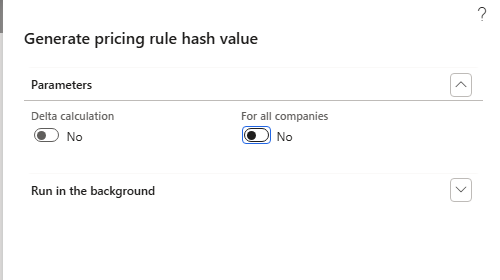
Generate pricing rule hash value – For all companies set to No
2.2 Generate pricing rule lookup data – a hidden feature
In the first run this menu item gave "Access Denied … guppricingruleconditionviewpersistence" even for the admin user. The reason is in the menu item: it is bound to the feature Unified pricing management pricing rule performance enhancement (Feature management, not enabled by default). Access Denied here means "feature off", not "missing permission".
- Enable now in Feature management: the system regenerated the lookup data at once – "Regeneration has created 163 rows in Unified pricing rule lookup data table" (70 for USMF, 93 for USRT).
- The job itself then opened (Method, Batch size) and ran; the lookup table kept 70 rows for USMF – one per pricing rule.
- Order 001712 (oil 10) gave the same 97.00 − 9.70 = 873.00.
- Afterwards I disabled the feature again, so that the environment is as before.

Feature management – pricing rule performance enhancement
2.3 Migrate commerce pricing setup – only for companies without Pricing management
The migration copies Commerce trade agreements, discounts and coupons into Pricing management. Step 1 is Setup price group mapping (Generate, Validate): it proposed new price attribute values for the Commerce price groups (01, 02, 03 channel → UP-01…UP-03; 01, 02, 03, 09 customer → UP5-…).
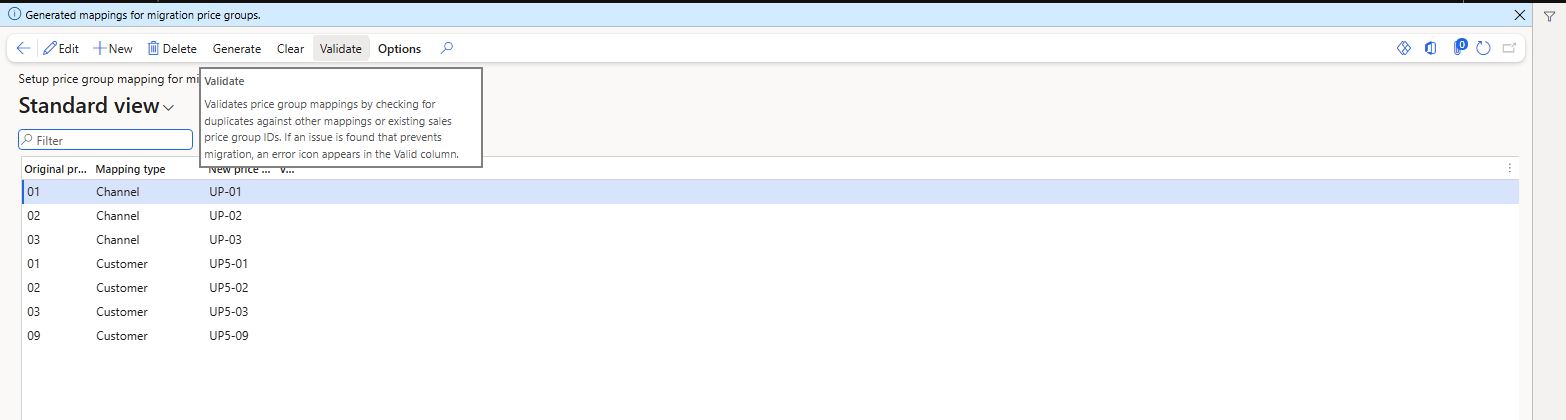
Price group mapping generated for the migration
The migration job itself stopped three times, each time before changing anything:
- "The feature Unified pricing management pricing rule performance enhancement needs to be enabled."
- "Coupon prefix is required." – even with Add coupon prefix = No.
- "A sales trade agreement price component code already exists and does not match the required migration name. Please delete it before proceeding." The application code expects the code Sales Trade Agreement Price; USMF already has Sales trade agreement, which carries all our trade agreements since Chapter 3.
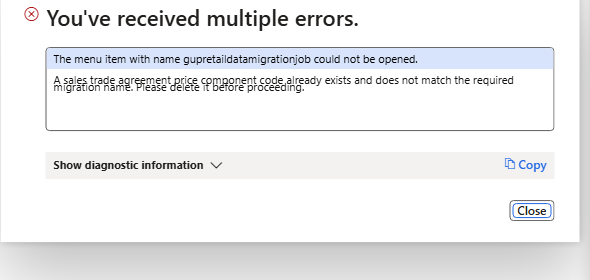
Migration refused – existing sales trade agreement component code
| NOTE: Migration is meant for a company that moves from Commerce pricing to Pricing management, before trade agreements exist in Pricing management. In USMF it was not run (deleting the component code would delete our setup); the trade agreement counts stayed the same. The seven price group mapping rows remain in the mapping page. |
|---|
2.4 Recalculate price – run it with care
Goal: bring the old order 001345 (Green Valley Hypermarket, oil still at 100.00 from Chapter 3) up to date without opening it. In the dialog I selected Sales order number = 001345 (the field accepts a value only through its lookup – typing the number was not taken), left all other filters empty and clicked OK.
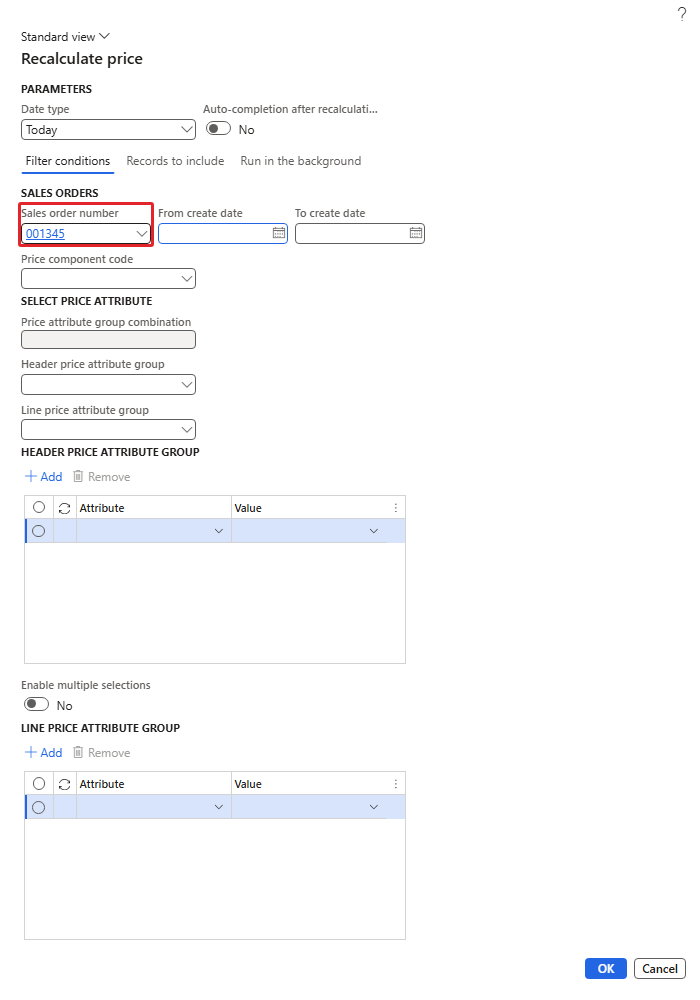
Recalculate price – Sales order number 001345
Order 001345 was updated to 97.00 with the SunGold discount 9.70 (net 873.00). But the job did much more: it recalculated all open sales orders that use the pricing engine in USMF – 58 order lines between 001341 and 001595 were changed within two minutes, including:
- our old test orders (for example 001344 from Chapter 3: 95.00 → 97.00 − 9.70; 001347 from Chapter 4: rice 48.00 → 50.40),
- order 001594, a project item requirement of customer US-023 (project 000057) that was not part of this series. It got 816.00 with a discount of 16.32 – 2% from our "order value 500+" threshold discount, which applied to all customers and products. Its values before the job are not known.
| RESULT: In this environment the Sales order number filter did not limit the job to that order – Recalculate price updated every open engine order in the company. Never run it in a shared or production company without testing the filters on a copy first, and prefer Sell > Recalculate on the single order (Chapter 9) when only one order is concerned. |
|---|
| NOTE: After this incident I disabled the threshold discount USMF-000026 (all customers, all products), so that it no longer affects orders outside our training data. Later, with the owner's agreement, I ran Sell > Recalculate on order 001594 alone: the 16.32 discount was removed and the line is 5 × 816.00 = 4,080.00 again. |
|---|
3. The inquiries and the price report
Navigation: Pricing management > Inquiries and reports
The three inquiries (Trade agreements, Margin component price adjustments, Discounts) share one dialog: Currency, From/To date, Price component code (required, "Component code is missing" without it), Posted/Enabled, price attribute group combination and attribute details, price group, header and line attribute groups.
The Price component code is a multi-select lookup: open it, tick the row with the circle on the left, then click Select. Typing the name into the field does not work.
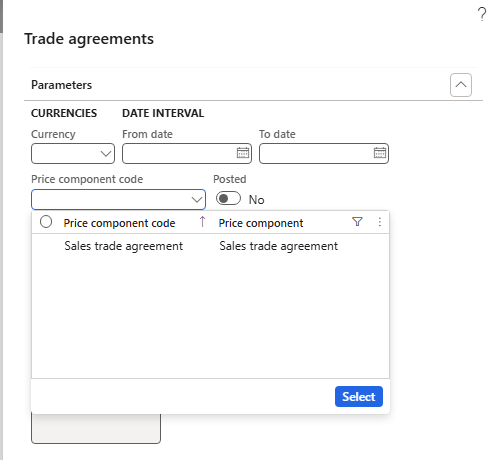
Multi-select lookup – tick the row, then Select
- Discounts, PM Brand promotion, Enabled = No: lists the disabled discounts – ST100028 (mix and match), ST100075 (Chapter 11 fund promo), USMF-000005 (free item), USMF-000026 (threshold).
- Discounts, PM Brand promotion, Enabled = Yes: ST100026 (SunGold), ST100027 (rice volume), ST100029 (rice coupon), ST100050 (web orders), ST100076 (tea supplier-funded).
- Trade agreements, Sales trade agreement, Posted = Yes: all posted journal lines with their attribute details – our PDJ-00059…PDJ-00109 and the demo PDJ-00034.
- Margin component price adjustments, PM Segment adjustment, Enabled = Yes: USMF-000002 HORECA service surcharge.
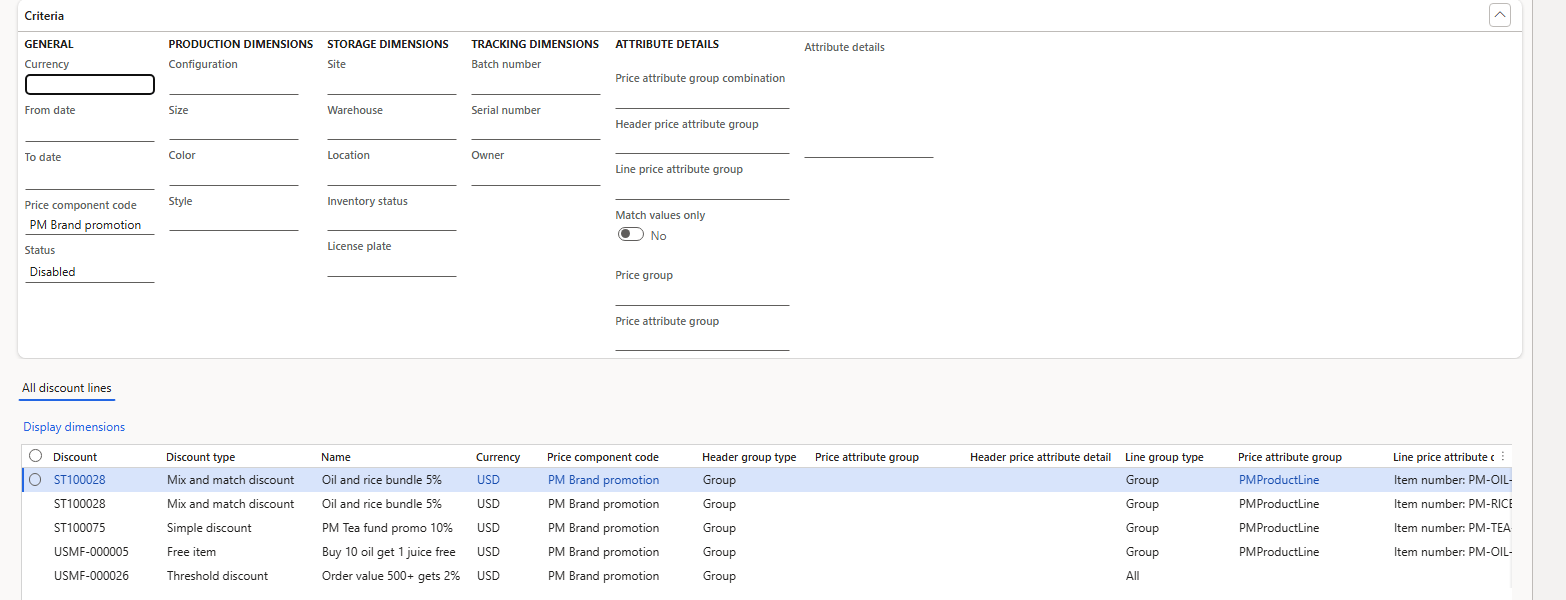
Discount inquiry – disabled PM Brand promotion discounts
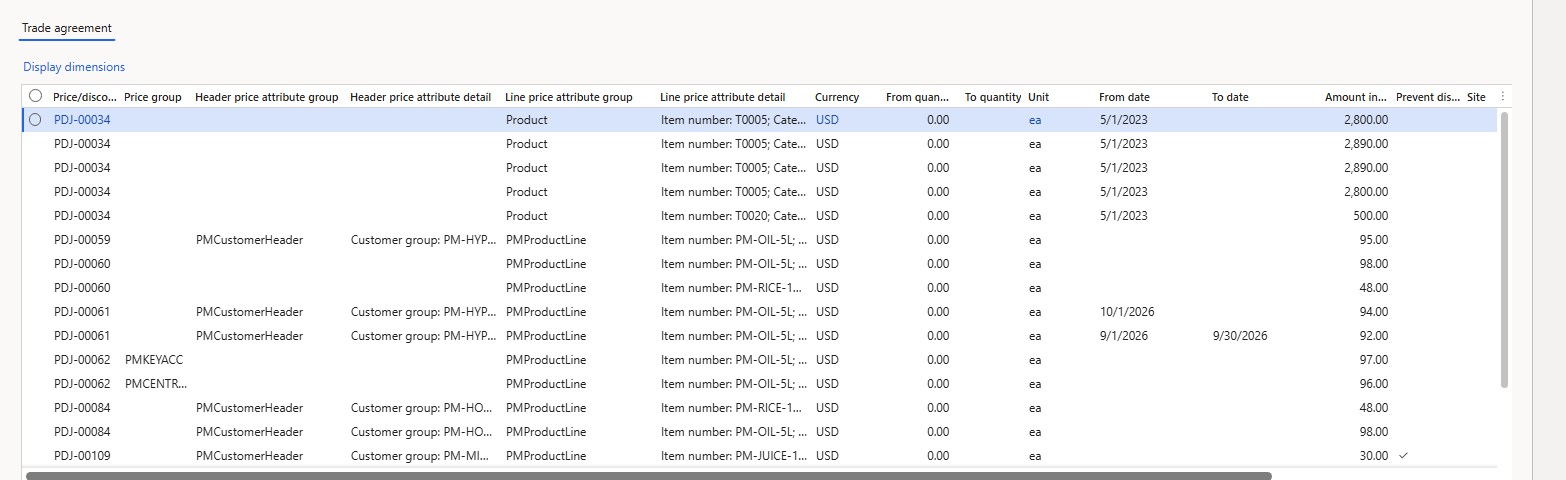
Trade agreement inquiry – posted lines
3.1 Price report
Price report > Generate opens Price report parameters: Order header price attributes, Report name, Sales quantity, From/To date, Maximum number of batch tasks, Disable the product variant explosion, Dimensions and Records to include (Customer account, Item number).
The two fields on Records to include are read-only – the ranges are entered through Filter, which opens the query dialog "Run price report query range": Criteria PM-C001 for Customer account and PM-OIL-5L for Item number. Without ranges the report would calculate every customer × every product of the company.
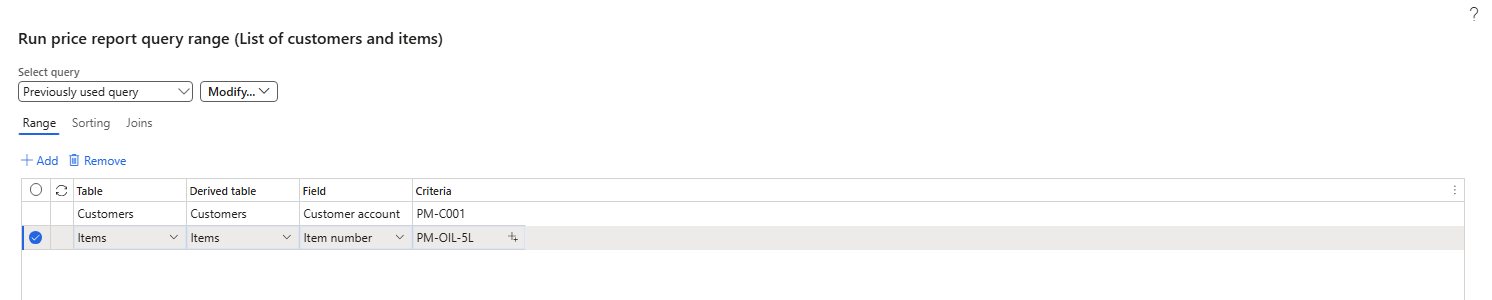
Price report query range – one customer, one item
Report "PM oil price check", quantity 10: one line – PM-C001, PM-OIL-5L, trade agreement PDJ-00062, base price 97.00, discount ST100026 9.70, sales unit price 87.30, net amount 873.00 – exactly what a sales order gives (order 001711).

Price report result
4. Troubleshooting checklist
Every row below was met and verified in this series.
| Symptom | Cause | What to do | Ch. |
|---|---|---|---|
| "Access Denied" on Pricing management pages | Feature Unified pricing management not enabled | Enable it in Feature management | 1 |
| Order ignores Pricing management | Order created before the feature / while Disable pricing management = Yes (flag set at creation) | Create a new order | 1 |
| New price not on existing lines | Prices are not pushed to existing orders | Sell > Recalculate on the order | 4, 9 |
| Journal price has no effect | Journal not posted | Post the journal | 3 |
| "Unable to find a unique …" on journal header | Combination typed on the header | Set attributes per line with Edit price attributes | 3 |
| Price attribute group cannot be saved / not valid | Name contains "-" / group edited | Rename; run Validation after every change | 2 |
| "The value … not found in … Pricing priority" | Price group rank without pricing priority | Create the pricing priority first | 5 |
| More specific price ignored | A price group rule wins over rules without price group | Check price groups and ranks | 5 |
| Rule enabled but ignored | Price component code not in the price tree | Add the code to the price tree (tree disabled while editing) | 6, 7 |
| Margin adjustment not added to a trade agreement price | Allow price adjustment = No on the trade agreement line | New journal with Allow price adjustment | 6 |
| Rule works later / not yet | Effective date vs. Date type parameter | Check validation period and Date type | 4, 6 |
| Price tree save errors | Duplicate pricing sequence; empty concurrency mode for margin codes | Unique sequence; Compounded | 6 |
| Only one of two discounts applied | Exclusive / Best price concurrency | Choose Compounded or Always apply if both should apply | 8 |
| General margin rule replaced | A rule with a higher combination rank on the same code | Intended; check ranks | 8 |
| "Cannot create a record … already exists" on a new discount | Number sequence proposes an existing ID | Set the next number above existing IDs | 7, 8 |
| Quantity discount cannot be enabled | Tiers do not increase the discount (e.g. Unit price type) | Use Percentage off or increasing tiers | 7 |
| Max per order not applied | Applied only at Complete | Click Complete | 7 |
| Discount not applied although the rule matches | Prevent discount on the trade agreement line | Intended; check the journal | 7 |
| Discount removed from one order | Deselected in Sales order discounts | Intended; reselect if needed | 9 |
| Sales order attributes page empty | No Sales order attribute group in the parameters | Set the parameter; header price attribute group with source SalesTable | 9 |
| "A bar code is not configured for coupons" / "The bar code is longer than the mask specified" | No coupon bar code setup, or its mask is missing / too short | Mask character of type Coupon code, Coupon mask long enough, bar code setup with that mask, parameter Coupon bar code | 7 |
| "Coupon … is not active" on the order | Coupon code line still Inactive | Activate the code line and the coupon | 7 |
| Typed price never changes | Manual entry retained | Change quantity and answer Unit price = Yes in Overwrite prices and discounts | 9 |
| "Access Denied" on Generate pricing rule lookup data | Feature pricing rule performance enhancement off | Enable the feature (lookup data is regenerated) | 10 |
| Inquiry: "Component code is missing" | Multi-select lookup not ticked | Tick the row, click Select | 10 |
| Fund discount given in full although the fund is used up | Fund is booked only at Complete | Complete and Submit the order | 11 |
5. Series wrap-up
Over ten chapters we built a complete pricing setup for a food distributor in USMF with our own items (PM-OIL-5L, PM-RICE-10, PM-JUICE-1L) and customers (two hypermarkets, a grocery and a hotel): price attributes, component codes, trade agreements with quantity and date breaks, price groups and priorities, margin adjustments, five discount types, concurrency, and the everyday work on the sales order.
Data in USMF at the end of the series (for reference):
- Price tree Inheritance with PM Segment adjustment (8), PM Brand promotion (9) and PM Seasonal adjustment (10, Compound).
- Enabled rules: USMF-000002 (HORECA 5%), ST100026 (SunGold 10%), ST100027 (rice volume), ST100050 (web orders 3%).
- Disabled rules: USMF-000003, USMF-000004, USMF-000006 (margin); ST100028 (mix and match), USMF-000005 (free item), USMF-000026 (threshold). ST100029 (rice coupon) is enabled through the active coupon USMF-000002.
- Posted journals PDJ-00059 to PDJ-00062, PDJ-00084 (HORECA, allow price adjustment) and PDJ-00109 (minimarket juice, prevent discount).
- Parameters changed: Unified pricing management enabled, Enable price details = Yes, Customer and Sales order attribute groups set, coupon bar code = PMCoupon. Feature pricing rule performance enhancement: tested and disabled again.
Thank you for following the series. I hope it saves you some of the hours these traps cost me.
That's all, folks!
Cheers!
Salman Ahmad
D365 F&O Consultant (Finance, SCM, Project Accounting)
← Previous: Pricing Management in Dynamics 365 SCM — Chapter 9 – The Sales Order, End to End | Next: Pricing Management Chapter 11 →