
Pricing Management in Dynamics 365 SCM
Chapter 8 – When Rules Compete: Concurrency
Hello everyone! Hope you are all doing well.
In the last two chapters I kept every test clean: one adjustment or one discount per line. Real price lists are not that polite. A hypermarket order of 10 cartons of sunflower oil qualifies for the SunGold 10% promotion and for the order value discount at the same time. A hotel gets a surcharge for all products and a different one for oil. Which rules win, which are combined, and how?
This is called concurrency, and Pricing Management controls it on three levels. In this chapter we test each level with real orders and check the math in the Price details.
Today's agenda
- The three levels of concurrency.
- Discounts on one line: Exclusive, Always apply, Compounded, Best price.
- A mixed case: Exclusive plus Always apply.
- Margin adjustments of one code: the combination rank decides.
- Two margin codes: both count – and what Compound changes.
- What was not covered.
- Summary.
1. The three levels of concurrency
- Between trade agreement prices: the combination rank and price groups decide (Chapters 3–5).
- Between rules of the same price component code: for discounts the Discount concurrency mode of each discount; for margin adjustments the concurrency model Price attribute combination rank (read-only).
- Between price component codes: the price tree – pricing sequence, Concurrency mode across priority and the Compound flag.
The test setup for sections 2 and 3: Al Madina Hypermarket (PM-C001) orders 10 × PM-OIL-5L at 97.00 = 970.00. Two discounts of the code PM Brand promotion qualify:
- ST100026 SunGold 10% (simple discount) – 9.70 per unit.
- USMF-000026 order value 500+ gets 2% (threshold discount) – the order is 970.00.
Only the Discount concurrency mode of the two discounts is changed between the tests. To change it: set the discount to Disabled, change the mode on the General FastTab, save and enable it again.
Navigation: Pricing management > During-sales pricing > Discounts > All discounts > General > Discount concurrency mode
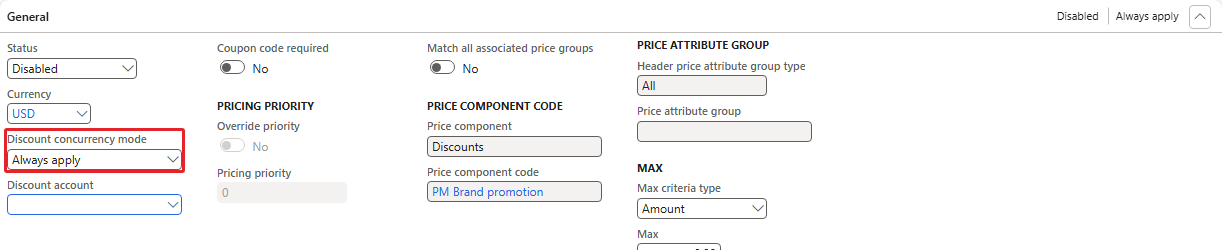
Discount concurrency mode on the threshold discount (here Always apply)
2. Discounts on one line
2.1 Both Exclusive (the default of our code)
Order 001587: discount 9.70 per unit, net 873.00. The Price details list only ST100026:
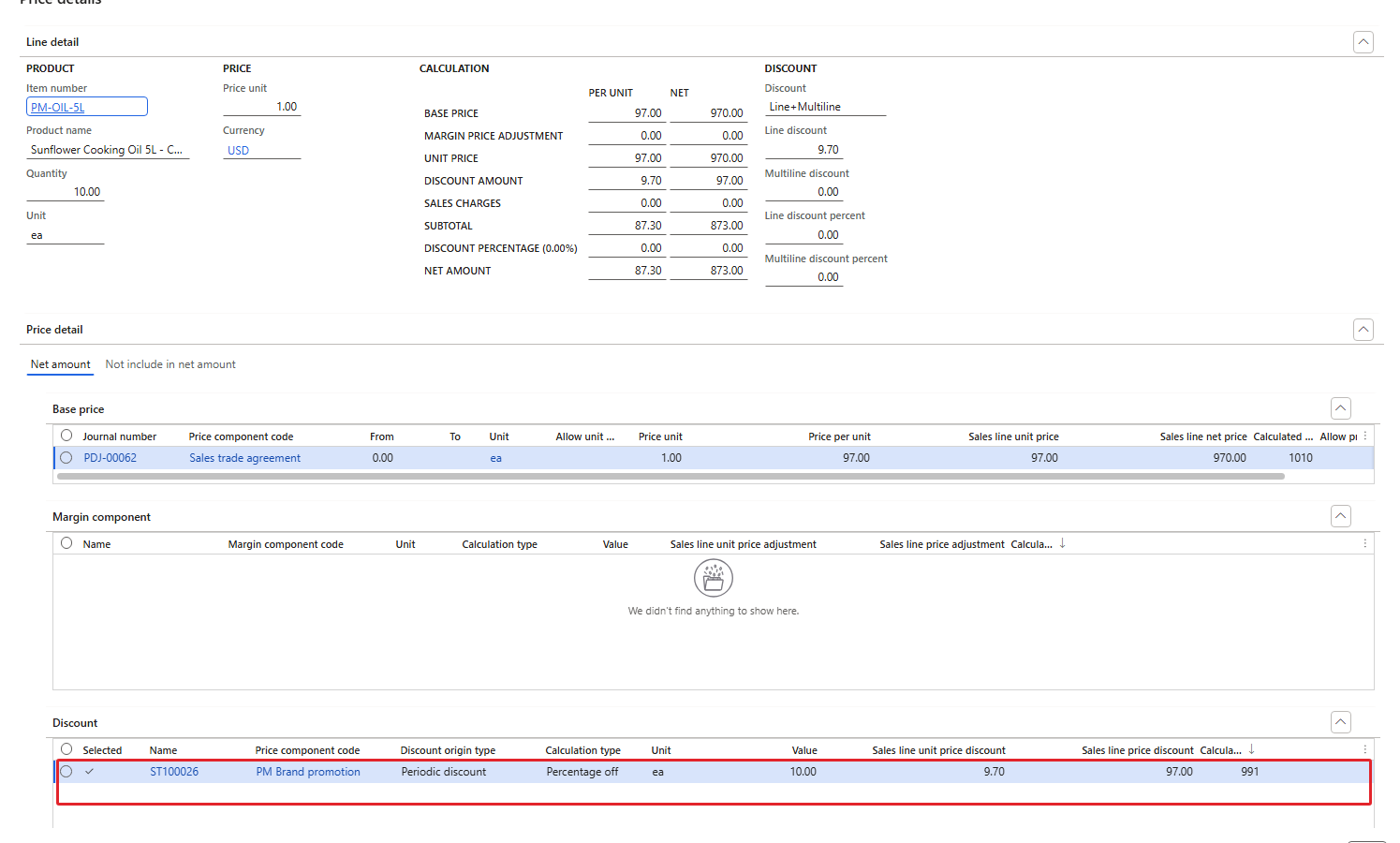
Both Exclusive – only the SunGold discount is applied
An exclusive discount cannot be combined with other discounts; of two exclusive discounts the larger one (10% = 9.70 vs 2% = 1.94) was applied.
2.2 Both Always apply
Order 001588: discount 11.45 per unit, net 855.54. Both discounts appear in the Price details:
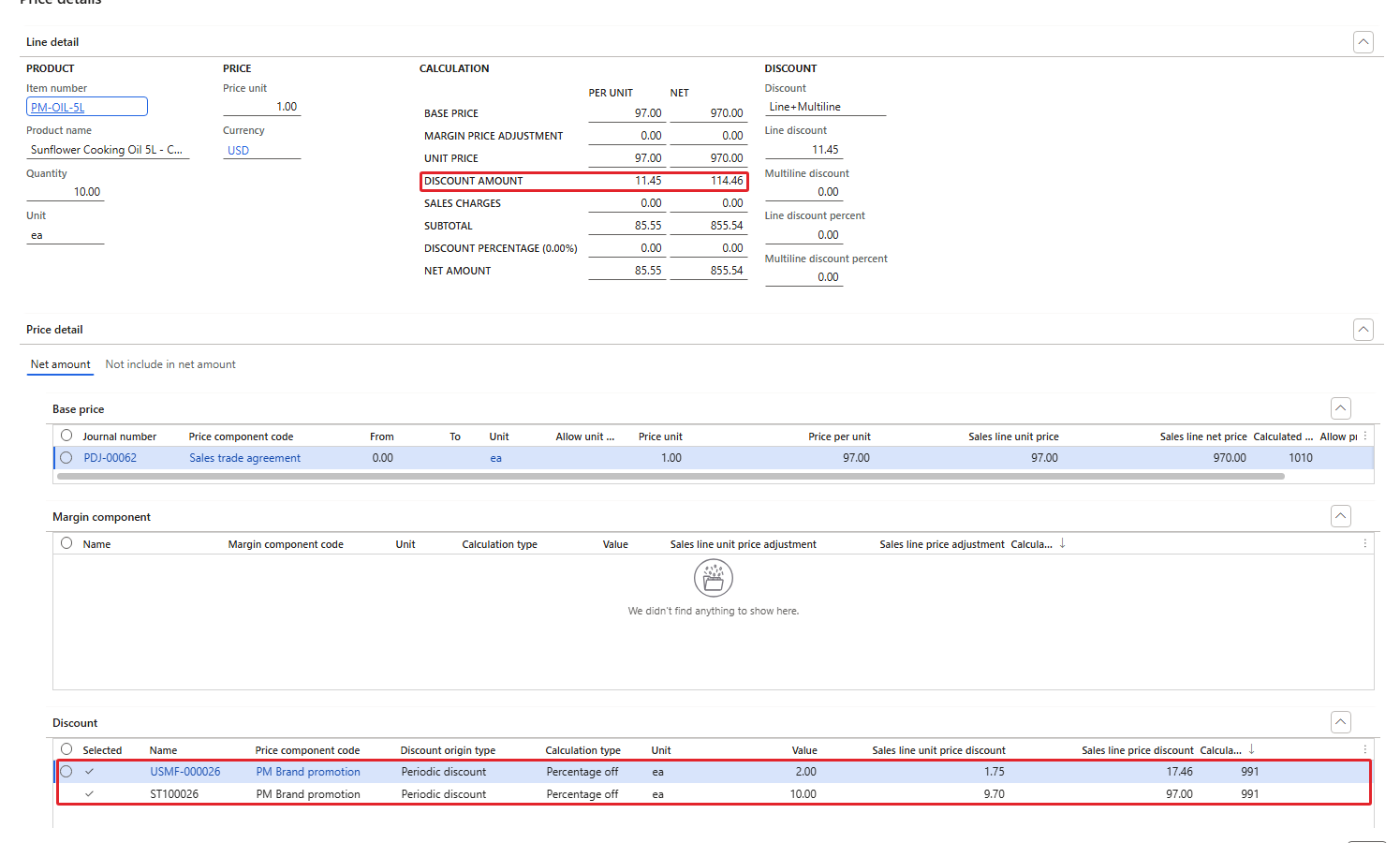
Both Always apply – SunGold 9.70 and threshold 1.75 per unit
| Step | Per unit | For 10 units |
|---|---|---|
| Unit price | 97.00 | 970.00 |
| − SunGold 10% of 97.00 | 9.70 | 97.00 |
| − Threshold 2% of 87.30 | 1.75 (1.746) | 17.46 |
| = Net | 85.55 | 855.54 |
Note that the 2% was calculated on the price after the first discount (87.30), not on 97.00 (which would be 1.94).
2.3 Both Compounded
Order 001589: exactly the same result as Always apply – 11.45 per unit, net 855.54, both discounts listed, the second calculated on the reduced price.
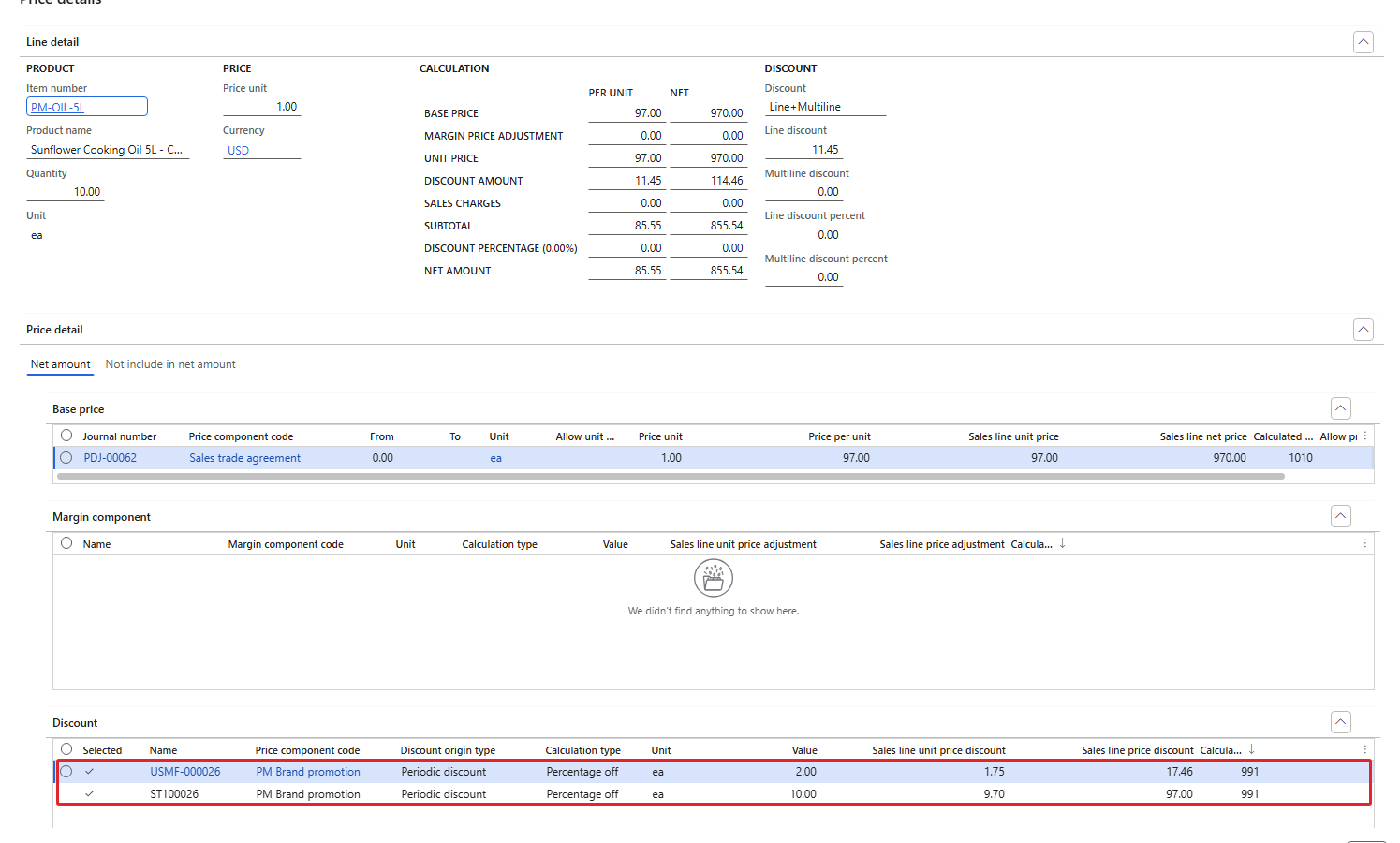
Both Compounded – same amounts as 2.2
2.4 Both Best price
Order 001590: discount 9.70 per unit, net 873.00 – only the SunGold discount, the one that gives the lowest price.
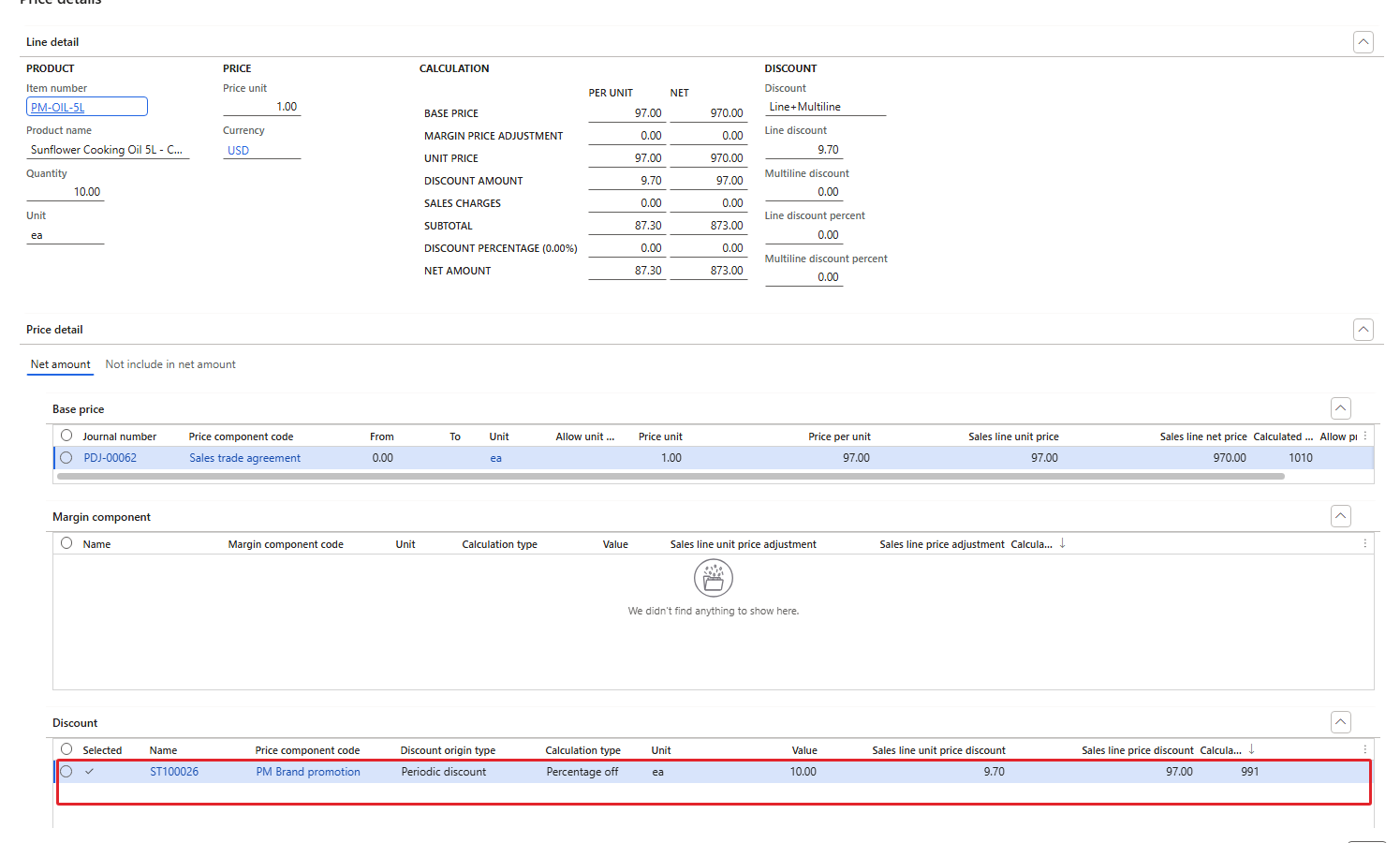
Both Best price – only the larger discount
3. A mixed case: Exclusive plus Always apply
SunGold back to Exclusive, the threshold discount on Always apply. Order 001591: 11.45 per unit, net 855.54 – both discounts were applied, the threshold again on the reduced price (1.75).
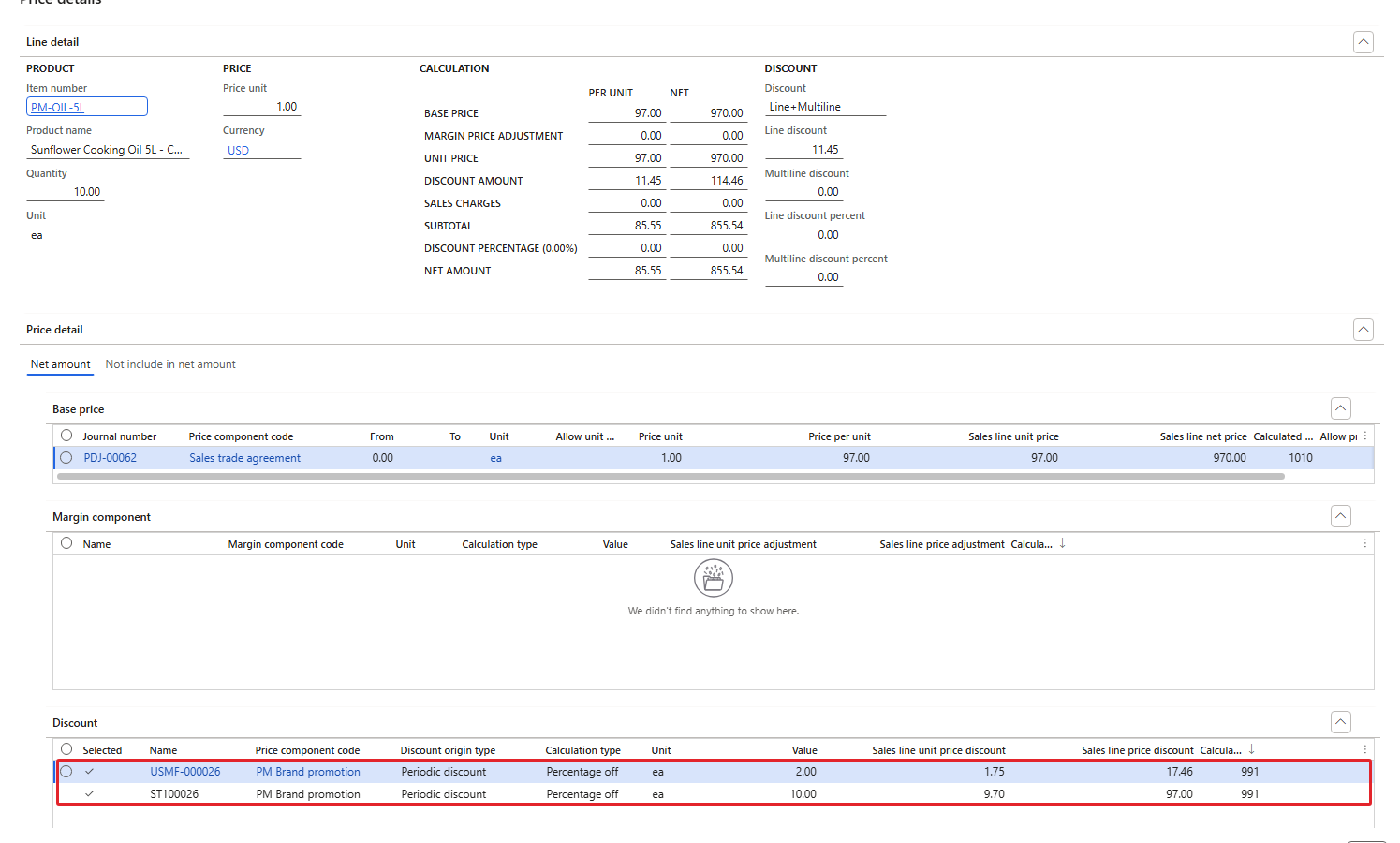
Exclusive + Always apply – both applied
| Order | SunGold | Threshold | Discount per unit | Net amount |
|---|---|---|---|---|
| 001587 | Exclusive | Exclusive | 9.70 | 873.00 |
| 001588 | Always apply | Always apply | 11.45 | 855.54 |
| 001589 | Compounded | Compounded | 11.45 | 855.54 |
| 001590 | Best price | Best price | 9.70 | 873.00 |
| 001591 | Exclusive | Always apply | 11.45 | 855.54 |
| RESULT: Exclusive and Best price let only one discount win (the larger one). Compounded and Always apply combine the discounts, each one calculated on the price after the previous discount. An Always apply discount was added even next to an Exclusive discount. |
|---|
| NOTE: The mode "Price attribute combination rank" (discounts compete on the rank of their attribute combination) was not tested for discounts in the current environment; we test the rank logic with margin adjustments in the next section. At the end of the chapter both discounts were set back to Exclusive. |
|---|
4. Margin adjustments of one code: the combination rank decides
Margin adjustments have no concurrency mode to choose. The field Concurrency model always shows Price attribute combination rank: if several rules of the same code apply, the rule with the highest combination rank wins; rules with the same highest rank all apply.
Test: next to USMF-000002 (HORECA, all products, 5%, combination PMCustomerHeader-All, rank 1000) I created a second rule on the same code PM Segment adjustment:
- USMF-000006 – HORECA oil surcharge 2%: header Customer group = PM-HORECA, line combination PMCustomerHeader-PMProductLine with Item number = PM-OIL-5L, rank 1001, Percentage 2.
(Creating it hit the number sequence problem of Chapter 7 again: the first save proposed USMF-000005, which already existed; the second save got USMF-000006.)
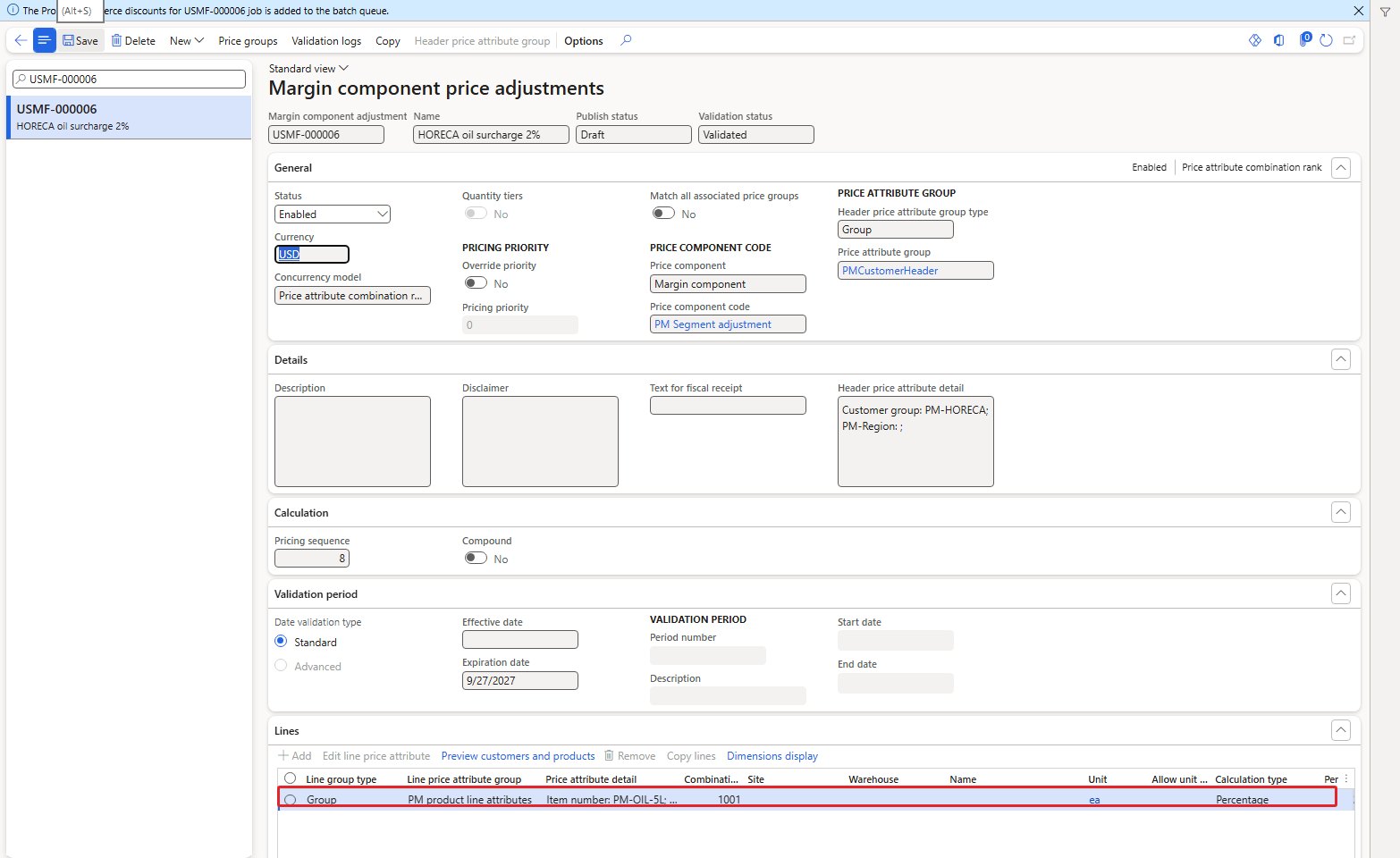
USMF-000006 – oil line with combination rank 1001
Order 001592 for Royal Palm Hotel, 10 × oil and 10 × rice:
| Item | Rules that match | Applied | Unit price |
|---|---|---|---|
| PM-OIL-5L | USMF-000002 (rank 1000, 5%) and USMF-000006 (rank 1001, 2%) | USMF-000006 only | 98.00 + 1.96 = 99.96 |
| PM-RICE-10 | USMF-000002 (rank 1000, 5%) | USMF-000002 | 48.00 + 2.40 = 50.40 |
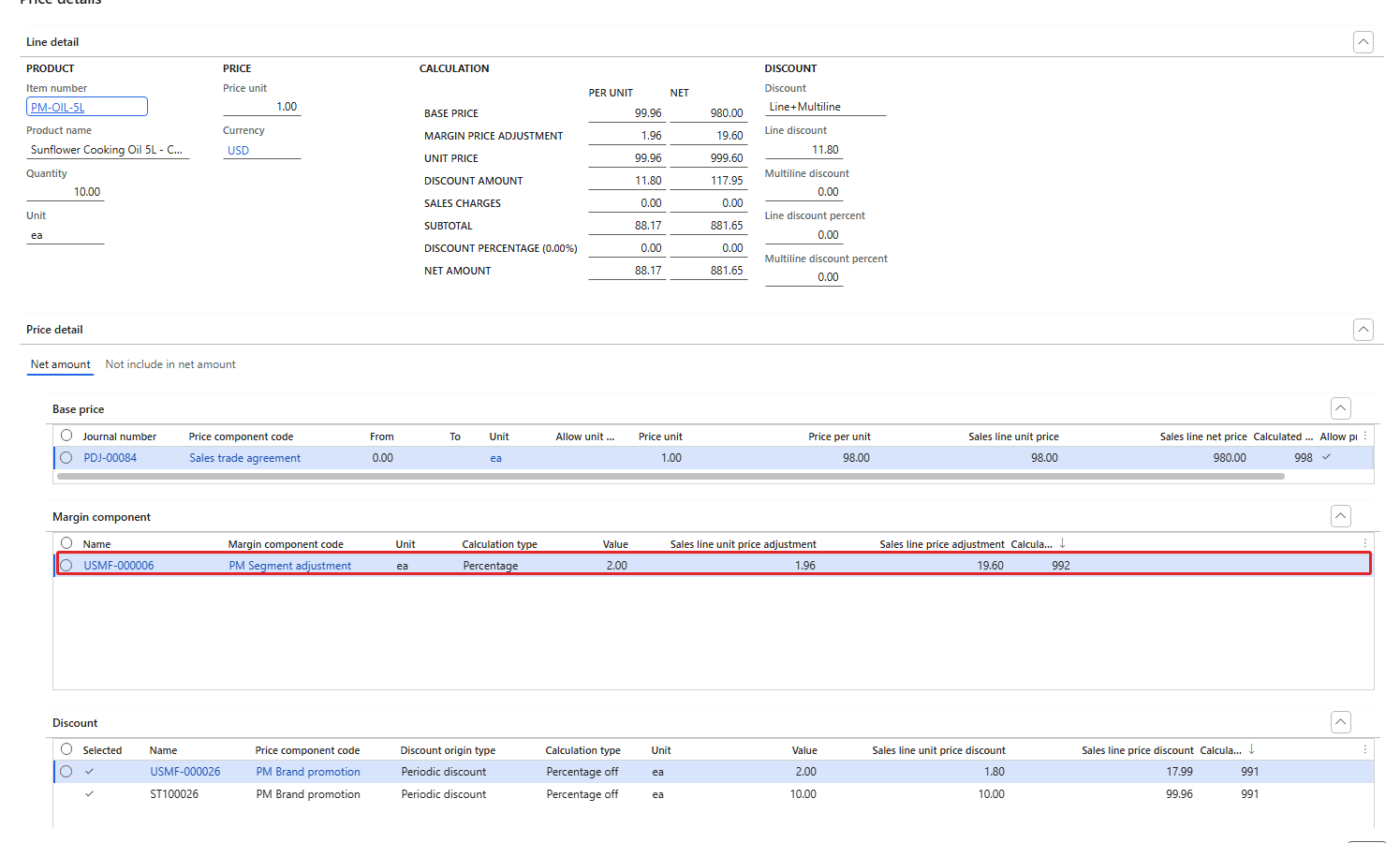
Price details of 001592 (oil) – only USMF-000006 in the Margin component grid
| RESULT: The more specific oil rule (rank 1001) replaced the general 5% rule for the oil; the rice kept the 5%. The discounts on this order (SunGold and the threshold discount, which was still on Always apply at that moment) were calculated on these prices as in section 2. |
|---|
5. Two margin codes: both count
Now two different margin codes. In Chapter 6 we created PM Seasonal adjustment with the rule USMF-000004 (HORECA, oil, 2%) and saw it ignored because the code was not in the price tree. Now I added it to the tree: pricing sequence 10, Concurrency mode across priority Compounded (empty and Best price are refused for margin codes, Chapter 6), Compound = No.
Navigation: Pricing management > Setup > Price component codes > Price trees
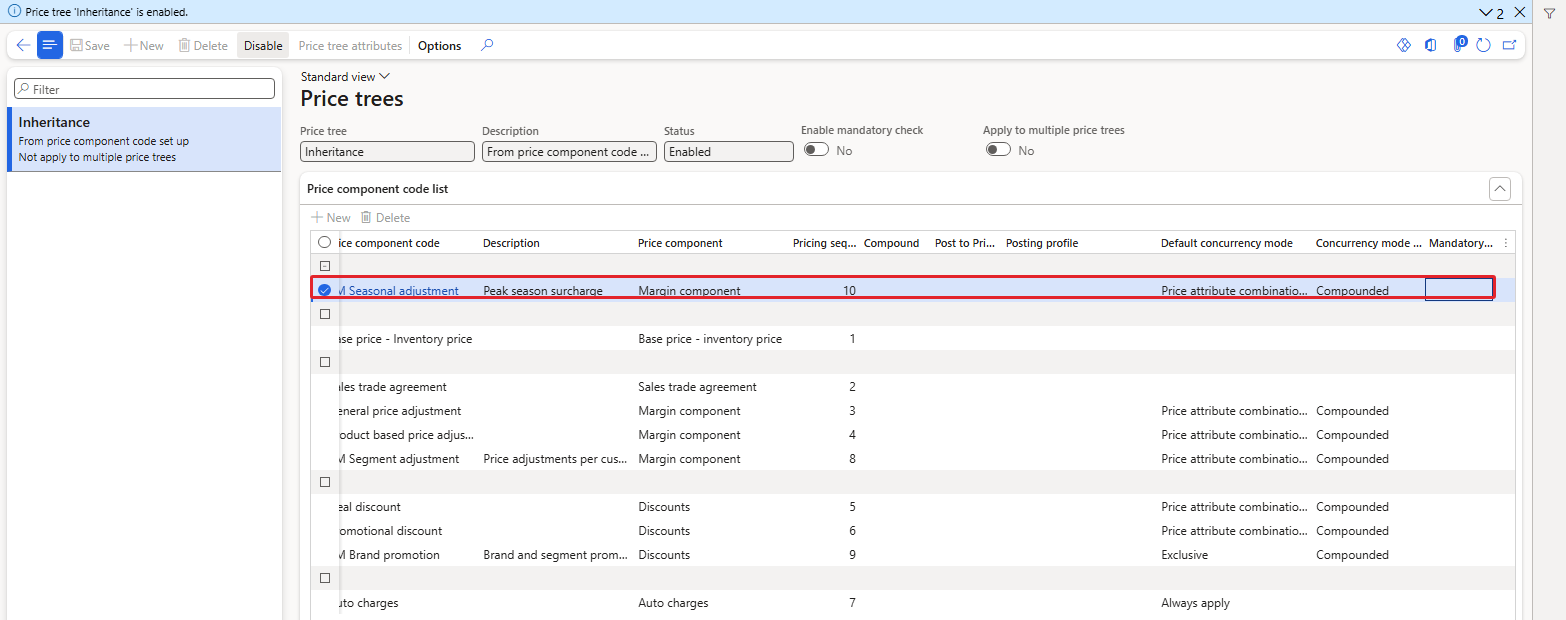
PM Seasonal adjustment at sequence 10
5.1 Compound = No
Order 001593 for Royal Palm Hotel, 10 × oil (USMF-000006 on PM Segment adjustment and USMF-000004 on PM Seasonal adjustment both apply):
| Step | Per unit |
|---|---|
| Base price (PDJ-00084) | 98.00 |
| + USMF-000006, 2% of 98.00 (sequence 8) | 1.96 |
| + USMF-000004, 2% of 98.00 (sequence 10) | 1.96 |
| = Unit price | 101.92 |
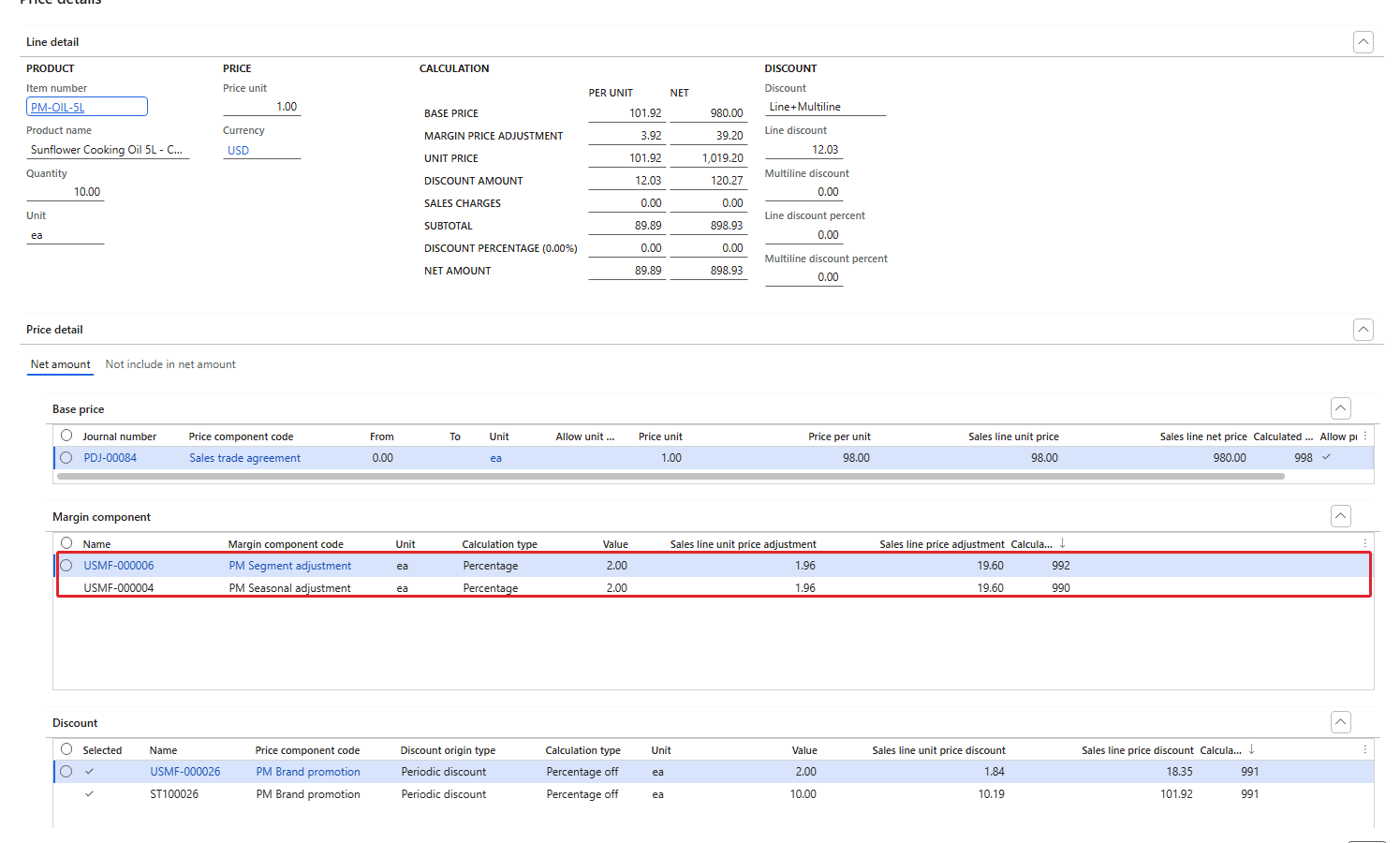
Two margin components – both 1.96, calculated pricing priority 992 and 990
Two observations: the adjustments of different codes are added up, and the seasonal code at sequence 10 was still applied before the discounts at sequence 9 – the SunGold discount (10.19) was calculated on 101.92. The margin adjustments together form the unit price; the discounts come after.
5.2 Compound = Yes
Then I disabled the tree, ticked Compound on the PM Seasonal adjustment line, saved and enabled the tree again:
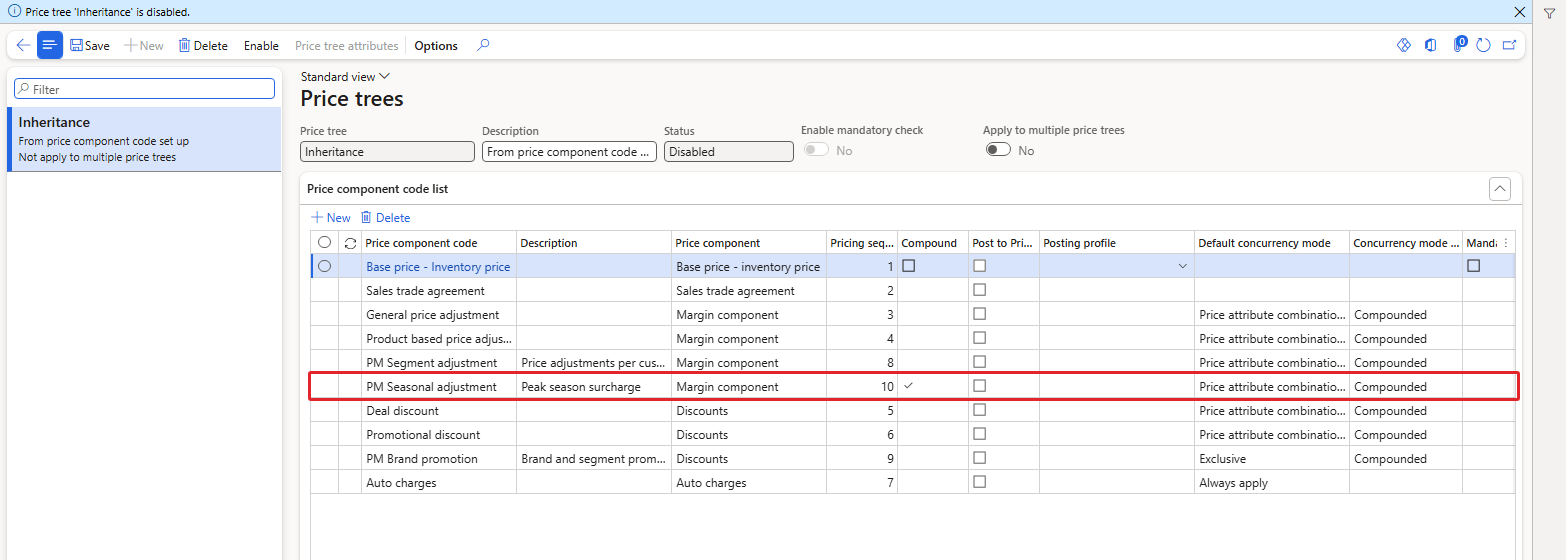
Compound ticked on PM Seasonal adjustment
Order 001595, same order again:
| Step | Per unit |
|---|---|
| Base price | 98.00 |
| + USMF-000006, 2% of 98.00 | 1.96 |
| + USMF-000004, 2% of 99.96 (running total) | 2.00 (1.9992) |
| = Unit price | 101.96 |
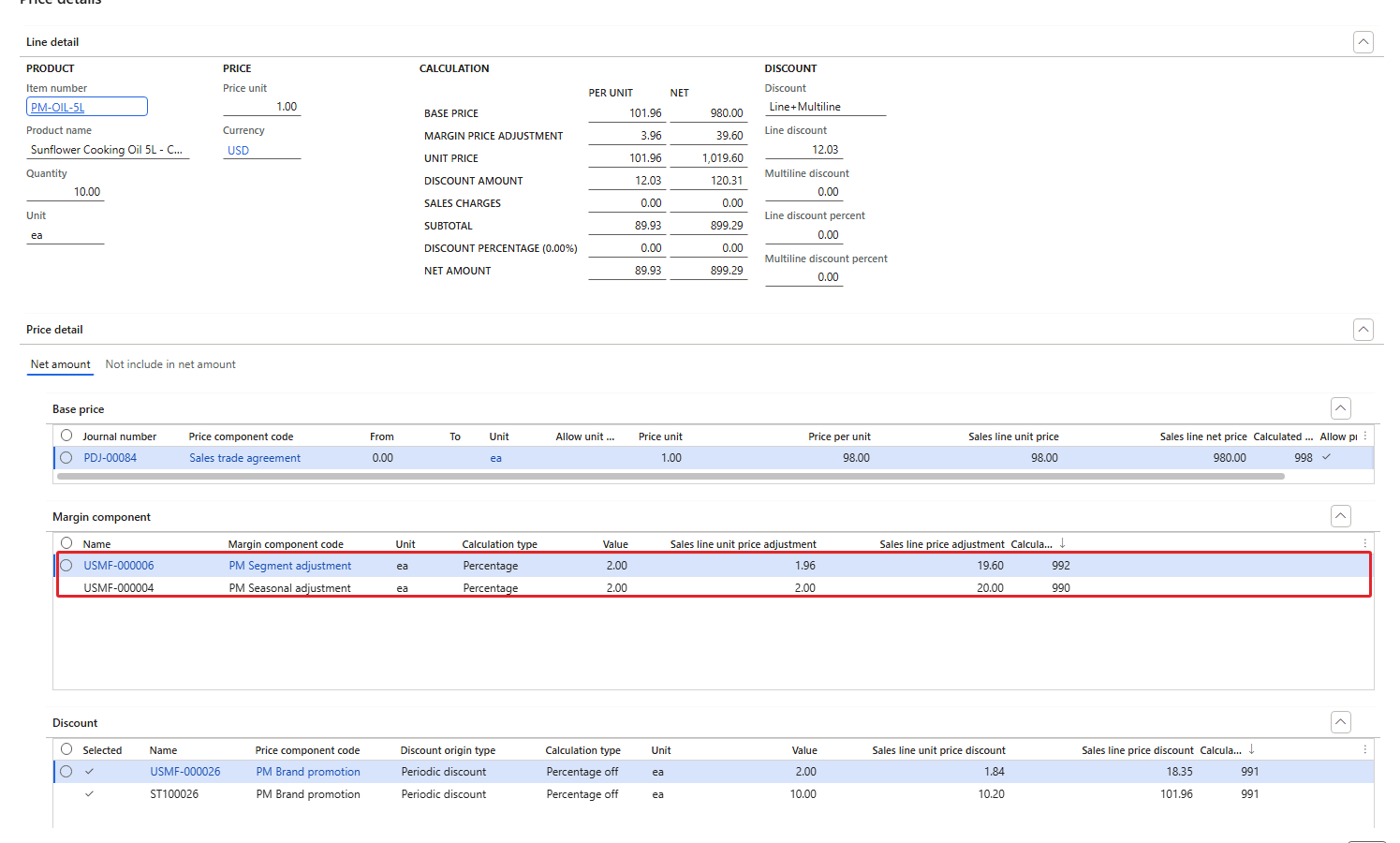
With Compound – the seasonal adjustment is 2.00 instead of 1.96
| RESULT: Without Compound each margin percentage is calculated on the base price; with Compound it is calculated on the running total after the earlier margin codes. The difference here is small (0.04 per unit), but with bigger percentages and more layers it adds up. |
|---|
6. What was not covered
Not validated in the current environment: concurrency between two discount codes in the price tree (Concurrency mode across priority Best price / Never compound for discount codes, and the related Pricing management parameter for the best price and compound concurrency model), the discount mode Price attribute combination rank, and price groups on discounts and adjustments.
7. Summary
- Discounts of the same code compete according to their Discount concurrency mode: Exclusive and Best price – one winner (the larger discount); Compounded and Always apply – combined, each on the price after the previous discount (9.70 + 1.75 instead of 9.70 + 1.94). An Always apply discount is added even next to an Exclusive one.
- Margin adjustments of the same code compete by combination rank: the specific oil rule (1001) replaced the general rule (1000).
- Margin adjustments of different codes are added up. The Compound flag in the price tree decides whether a percentage is calculated on the base price or on the running total.
- All margin adjustments come before the discounts, even when the margin code has a higher pricing sequence than the discount code.
State of USMF after this chapter: ST100026 and USMF-000026 back on Exclusive; USMF-000006 and USMF-000004 disabled (Royal Palm Hotel is back to the 5% surcharge only); PM Seasonal adjustment stays in the price tree at sequence 10 with Compound = Yes.
In the next chapter we put everything together on the sales order: recalculating existing lines, the Complete button and order summary, manual price overrides, sales order attributes and the price simulator.
That's all for today, folks. See you in the next chapter!
Cheers!
Salman Ahmad
D365 F&O Consultant (Finance, SCM, Project Accounting)
← Previous: Pricing Management in Dynamics 365 SCM — Chapter 7 – Discounts | Next: Pricing Management Chapter 9 →