
Treasury Documents in Dynamics 365 Finance — Chapter 2: Cash and Bank Management Set-up for Treasury Documents
Before the first guarantee can be requested or the first postdated check registered, a handful of switches, accounts, journals and number sequences must exist. SAMF had none of them. This chapter walks through the shared foundation in the order we built it, and explains every field. The set-up that belongs to a single document – the facility agreement, the payment method of a postdated check, the posting profile of a bill of exchange – is explained in that document's chapter.
In this chapter, we will cover the following topics:
- The chart of accounts for treasury documents
- A continuous number sequence and the treasury journal names
- Cash and bank management parameters: bank documents and postdated checks
- General ledger and pricing parameters that the processes depend on
- Bank accounts, the bank documents posting profile and bank reasons
The accounts behind the documents
Treasury documents move amounts between balance-sheet accounts long before cash moves: a guarantee margin is cash that is blocked at the bank, a postdated check is a receivable that is no longer open on the customer but not yet in the bank, and a discounted bill of exchange is cash received against a contingent liability. Each of these stages needs its own account so that the balance sheet shows the truth and the bank reconciliation stays clean.
Navigation: General ledger > Chart of accounts > Accounts > Main accounts
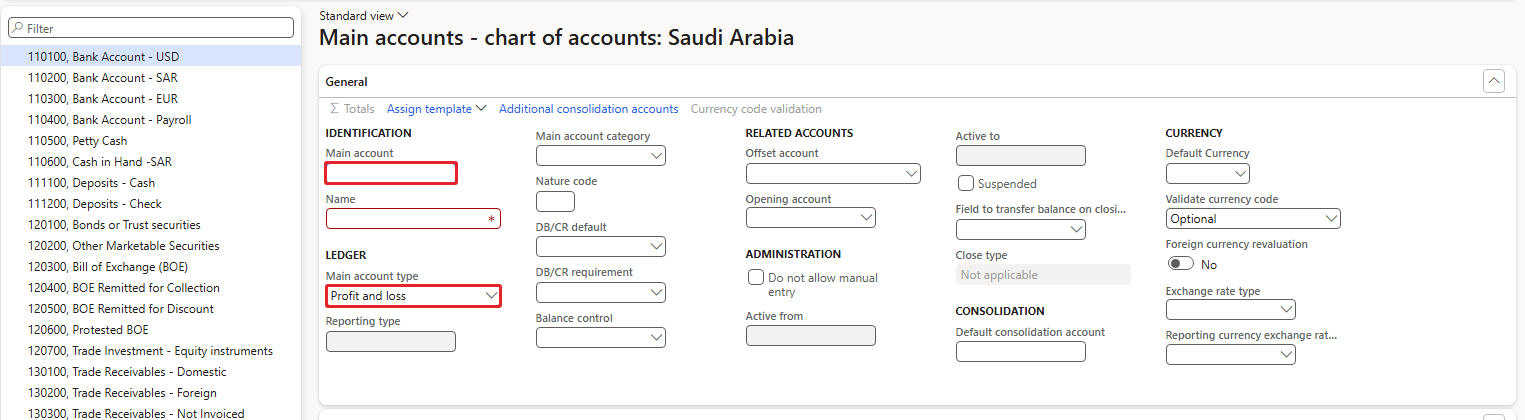
We created ten accounts in the "Saudi Arabia" chart. The account numbers follow the SAMF structure: 11xxxx cash and deposits, 13xxxx receivables, 20xxxx and 21xxxx payables and liabilities, 6xxxxx expenses.
| Account | Name | Type | Used by |
|---|---|---|---|
| 111300 | Cash margin – bank documents | Asset | LG and LC margin (bank documents posting profile) |
| 111400 | PDC received clearing | Asset | Postdated checks received, until maturity |
| 201400 | PDC issued clearing | Liability | Postdated checks issued, until maturity |
| 130800 | Bills of exchange receivable (drawn) | Asset | Customer posting profile TRS-BILL |
| 130900 | Bills remitted for collection | Asset | Customer posting profile TRS-BCOL |
| 131000 | Bills remitted for discount | Asset | Customer posting profile TRS-BDIS |
| 212400 | Liabilities for discounted bills | Liability | Liabilities for discount account on TRS-BDIS |
| 201500 | Promissory notes payable | Liability | Vendor posting profile TRS-NOTE |
| 201600 | Promissory notes remitted | Liability | Vendor posting profiles TRS-NREM and TRS-NINV |
| 618450 | Guarantee liquidation expense | Expense | Liquidation account for LGs |
Existing SAMF accounts were reused where they fit: 618190 Bank fees expense (charges and commissions), 200200 Accounts payable – foreign (LC settle account for the cash flow forecast), 130400 Other receivables (protested bills), 110100 Bank account – USD and 110200 Bank account – SAR.
Main account type – Profit and loss, Revenue, Expense, Balance sheet, Asset, Liability, Equity, Total, Reporting
Decides where the account appears in the financial statements and whether its balance is closed to retained earnings at year end. A clearing or margin account must be a balance-sheet type (Asset or Liability); if it is Profit and loss, the balance is closed at year end and the clearing never reconciles.
Example: 111300 = Asset.
NOTE: When we created the bill accounts with the automation, the type defaulted to Profit and loss and had to be corrected to Asset. Always check the type of new balance-sheet accounts – the default in the form is not a balance-sheet type.
Number sequence and journal names
Every treasury document that posts does so through a journal, and every journal takes its voucher numbers from the voucher series of its journal name. SAMF has the general ledger parameter Check continuous numbers switched on, so the voucher series must be a continuous number sequence. We created one sequence for all treasury journals.
Navigation: Organization administration > Number sequences > Number sequences > New
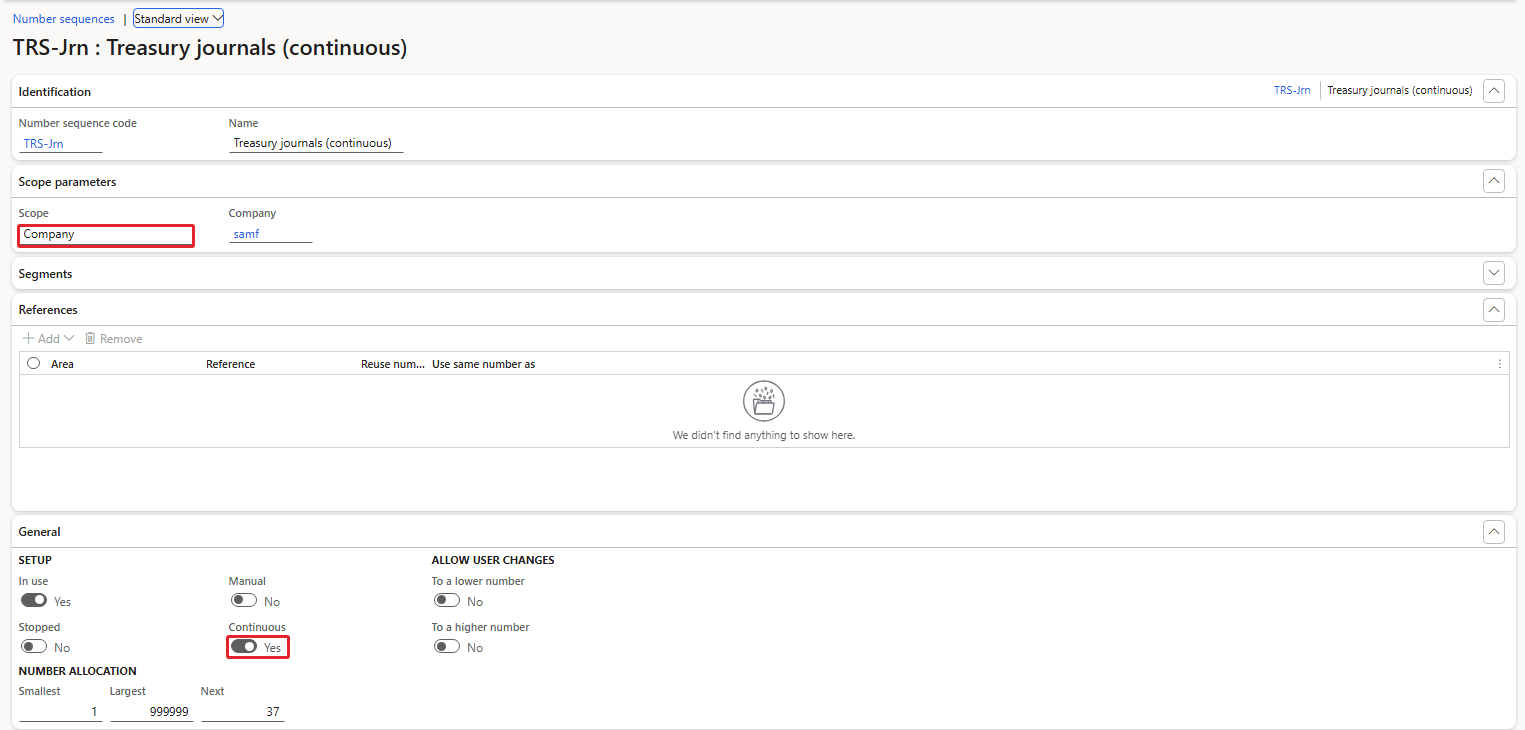
Scope / Company – Shared, Company, Legal entity, Operating unit
A company-scoped sequence numbers only the vouchers of that company. Vouchers are company data, so Company scope is the right choice.
Example: Company, samf.
Continuous – Yes / No
A continuous sequence never leaves gaps: a number that is taken and not used is put back into the status list and reused. Statutory audits in many countries, including Saudi Arabia, expect gap-free voucher numbers. Continuous sequences are slower, because every number is taken in a database transaction; for journals this does not matter.
Example: Yes.
Smallest / Largest / Next – Numbers
The range of the sequence and the next number to be issued. The format (segments) gives the vouchers the pattern SAMF-#########.
Example: 1 / 999999 / next 37 after the book's examples.
| NEGATIVE CASE: We first selected a non-continuous voucher series on a journal name. Message: This voucher series cannot be selected because it is not set to run continuously and the ledger module is set up to check for continuous numbers. |
|---|
Navigation: General ledger > Journal setup > Journal names
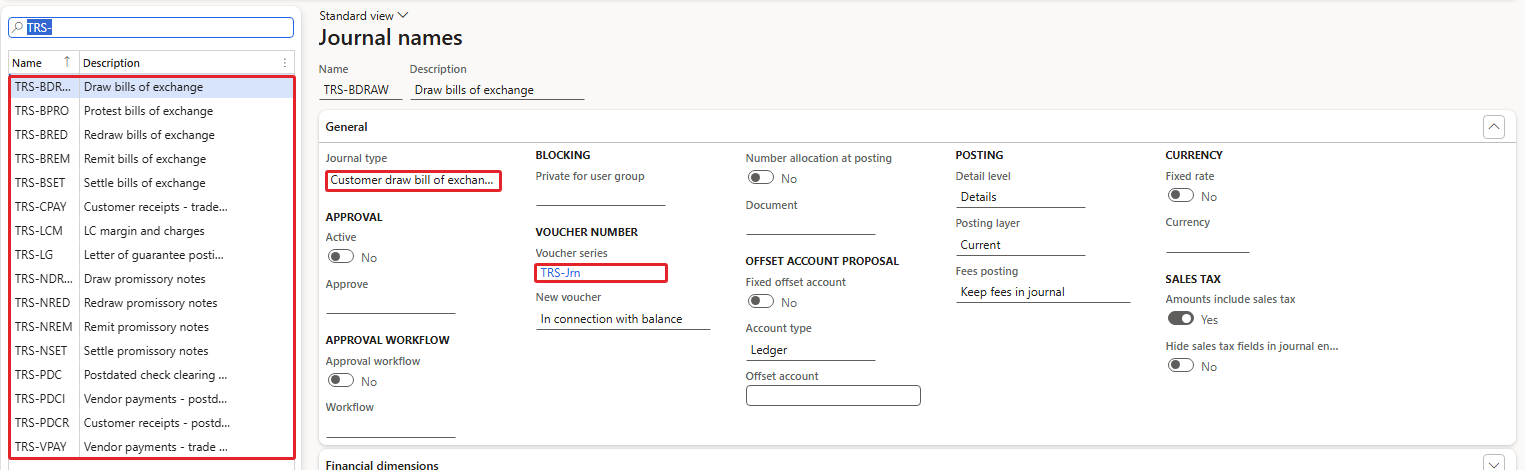
| Journal name | Journal type | Purpose | Chapter |
|---|---|---|---|
| TRS-LG | Daily | Letter of guarantee postings (margin, commissions, liquidation); set in Cash and bank parameters | 5–6 |
| TRS-LCM | Daily | Letter of credit margin and charges | 8 |
| TRS-VPAY | Vendor disbursement | Vendor payments for import LCs | 8 |
| TRS-CPAY | Customer payment | Customer receipts for export LCs | 9 |
| TRS-PDC | Daily | Postdated check clearing entries; set in Cash and bank parameters | 11 |
| TRS-PDCR | Customer payment | Customer receipts with postdated checks | 11 |
| TRS-PDCI | Vendor disbursement | Vendor payments with postdated checks; transfer journal for endorsed checks | 11 |
| TRS-BDRAW / BREM / BSET / BPRO / BRED | Customer draw / bank remittance / settle / protest / redraw bill of exchange | Bill of exchange cycle | 12 |
| TRS-NDRAW / NREM / NSET / NRED | Vendor draw / bank remittance / settle / redraw promissory note | Promissory note cycle | 13 |
Journal type – Daily, Vendor disbursement, Customer payment, Customer draw bill of exchange, …
The journal type decides which journal form opens, which account types are allowed and which posting logic runs. It cannot be changed once journals exist. The bill and note journal types only appear in the list when the configuration keys for negotiable instruments are on – in this environment they are, also for Saudi Arabia.
Example: TRS-BDRAW = Customer draw bill of exchange.
Voucher series / New voucher – Number sequence; Manual, In connection with balance, One voucher number only
"In connection with balance" takes a new voucher number each time the lines balance, which is what payment and treasury journals need.
Example: TRS-Jrn / In connection with balance.
Account type / Offset account – Ledger, Customer, Vendor, Bank, …
The default account type of new lines. The LG journal must have offset account type Ledger and no fixed offset account – the LG engine fills the accounts itself.
Example: TRS-LG: Ledger, no fixed offset.
Cash and bank management parameters
The parameters hold the switches for the bank documents and for postdated checks. Before we changed them, SAMF had all of them off.
Navigation: Cash and bank management > Setup > Cash and bank management parameters > General
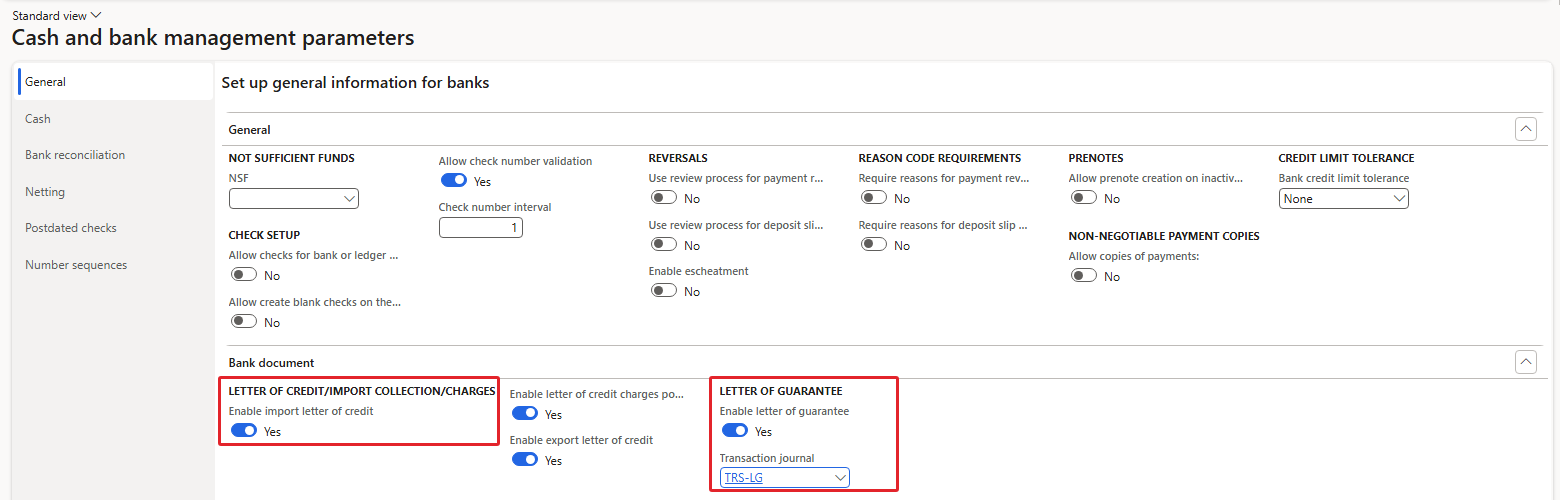
Enable import letter of credit – Yes / No
Shows the Bank document type field and the Letter of credit / import collection button on purchase orders, and opens the import LC form. With No, opening the form gives "The parameter "Enable Import Letter of Credit" should be marked to access this form."
Example: Yes.
Enable letter of credit charges posting – Yes / No – Saudi Arabia only
Part of the Saudi localization: lets LC charges (for example bank commissions) be posted against the LC and allocated to shipments and then to the purchase order as charges. The field is editable only for a legal entity with a Saudi address and only when import LC is enabled.
Example: Yes.
Enable export letter of credit – Yes / No
Same as import, for sales orders.
Example: Yes.
Enable letter of guarantee – Yes / No
Turns on the LG request button on quotations, orders and projects, the LG flags on reason codes and the liquidation account on the posting profile. Turning it off clears the transaction journal.
Example: Yes.
Transaction journal – Daily journal name
The journal that the LG engine creates and posts for every action with an amount. Only a Daily journal with offset account type Ledger and no fixed offset is accepted.
Example: TRS-LG.

Enable postdated checks – Yes / No
Shows the Postdated checks tab on customer and vendor payment journals and the postdated check clearing option on methods of payment.
Example: Yes.
Post journal entries for postdated checks – Yes / No
With Yes, the check is posted to a clearing account when the payment journal is posted, and the clearing is moved to the bank at maturity with Settle clearing entries. With No, a check with a future maturity date cannot be posted at all.
Example: Yes.
Clearing account for issued checks / for received checks – Main account
The default bridging accounts of postdated check payment methods.
Example: 201400 / 111400.
General journal for clearing entries – Daily journal name
The journal used by Settle clearing entries.
Example: TRS-PDC.
Transfer postdated checks to this vendor payment journal – Vendor disbursement journal name
Used when a customer's check is endorsed to a vendor.
Example: TRS-PDCI.
Withholding tax clearing account / Realize the conditional tax when postdated checks are drawn – Main account / Yes, No
For vendors with withholding tax and for conditional sales tax (cash-basis VAT) on postdated checks. Not used in our examples.
Example: blank / No.
General ledger and pricing parameters
Two company-wide parameters outside Cash and bank management had to change, and both came to light as negative cases. Both are company settings of SAMF only.
Navigation: General ledger > Ledger setup > General ledger parameters > Ledger
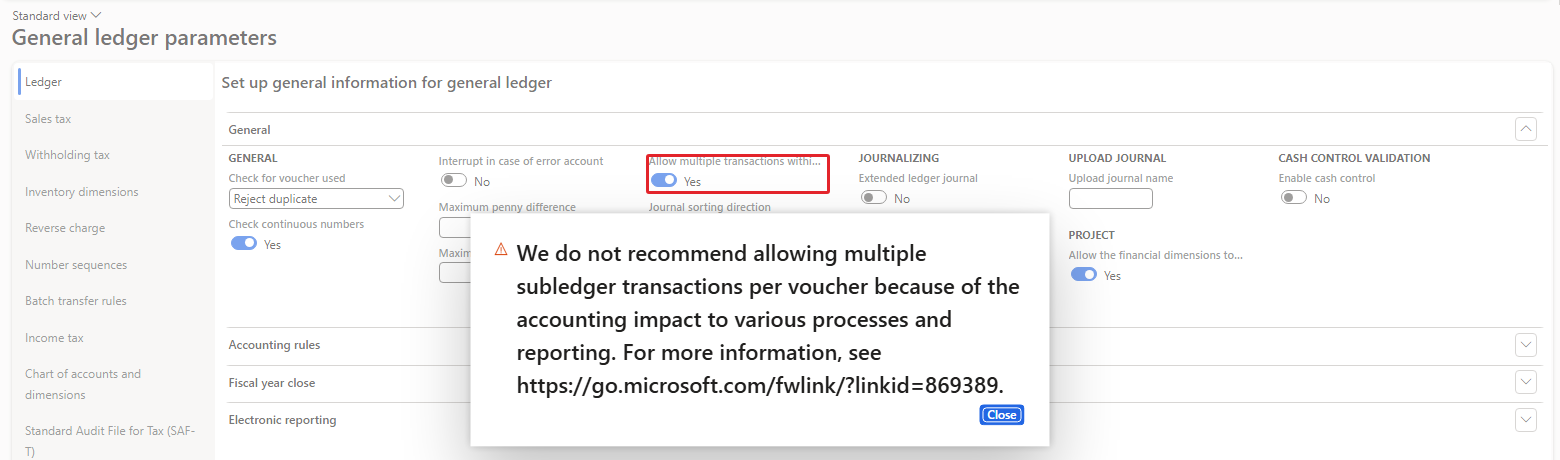
| NEGATIVE CASE: Receive from bank on a letter of guarantee posts the margin and the commission against the bank account in one voucher. With the parameter at No, the posting failed. Message: There can only be one bank account transaction per voucher |
|---|
Allow multiple transactions within one voucher – Yes / No
Lets a voucher contain several subledger transactions – for example two bank transactions. Microsoft warns against it because some processes and reports assume one subledger transaction per voucher, but the LG engine needs it.
Example: Yes (warning accepted).
Navigation: Sales and marketing > Setup > Pricing management parameters

| NEGATIVE CASE: A sales quotation line in SAMF could not be saved, because unified pricing management was active without any pricing tree. Message: Cannot find enabled pricing tree. Please correct pricing tree setup. |
|---|
SAMF never set up unified pricing, so we switched it off for the company. This has nothing to do with treasury, but every LG, LC and bill example starts from a sales or purchase document, and without lines there is no export LC.
Bank accounts
A facility agreement belongs to a company bank account, and its currency is the currency of that account. An import LC for a USD purchase order therefore needs a USD bank account with a USD facility. SAMF had only the SAR account SAUBank (Bank of Saudi, main account 110200), so we added a USD trade account.
Navigation: Cash and bank management > Bank accounts > Bank accounts > New

Bank account – Up to 10 characters
The ID of the account. Our first choice TRS-GTB-USD was cut to 10 characters by the field length, so the account is TRS-GTB-US.
Example: TRS-GTB-US.
Bank groups – Lookup
The bank (institution) the account belongs to, with its address and SWIFT/BIC. We created bank group TRS-GTB "Gulf Trade Bank".
Example: TRS-GTB.
Currency / Main account – Currency code / Main account
Transactions in the account currency; postings go to the main account. Only one bank account should post to a main account so that the bank balance and the ledger agree.
Example: USD / 110100.
Bank account number / IBAN – Text
Printed on payments and used in electronic files.
Example: SA44 2000 0001 2345 6789 1234.
Customer and vendor bank accounts are needed too: the issuing bank of an export LC is a customer bank account (we created ENBD-DXB, Emirates NBD, for the Dubai customer), and the advising bank of an import LC is a vendor bank account (BOC-SH, Bank of China Shanghai, for the Shanghai mill).
Bank documents posting profile
The bank documents posting profile tells the LG and LC engines which ledger accounts to use. It is resolved per facility type, then per facility group, then for all.
Navigation: Cash and bank management > Setup > Bank documents posting profile

Account code / Account-Group number – Table (facility type), Group (facility group), All
Which facility types the row applies to. A row for a facility type wins over a row for its group, which wins over All.
Example: Group LG, Group LC, Group IC.
Settle account – Main account
Letters of credit only: the account on which the cash flow forecast shows the unpaid shipments by maturity date. It is not used for postings.
Example: 200200.
Charges account – Main account
Commissions of LGs (issuance, increase, decrease, extension) and LC charges.
Example: 618190.
Margin account – Main account
The cash margin blocked by the bank for LGs and LCs.
Example: 111300.
Liquidation account – Main account – visible only when LG is enabled
The expense (or receivable) account debited when a beneficiary calls the guarantee and the bank pays it.
Example: 618450 on the LG row.
| NEGATIVE CASE: A second row for the same relation, or a row without a facility group, is refused. Message: Illegal specification of account relation. Specify a valid account relation, and try again. |
|---|
Bank reasons
The type of a letter of guarantee (bid, performance, advance payment, retention) and the reason for cancelling it are reason codes with two LG flags. The flags are visible only when the reasons form is opened as Bank reasons (or Financial reasons) and LG is enabled.
Navigation: Cash and bank management > Setup > Bank reasons
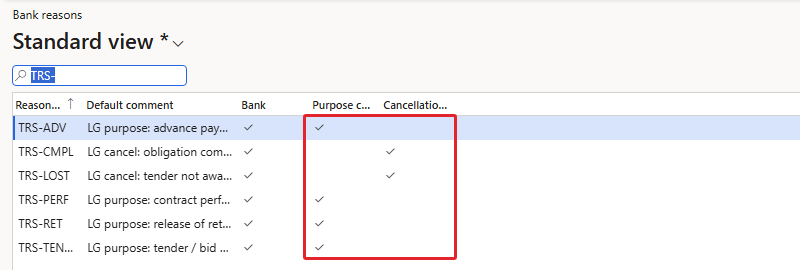
| Reason | Default comment | Purpose code | Cancellation reason |
|---|---|---|---|
| TRS-TENDER | LG purpose: tender / bid bond | Yes | |
| TRS-PERF | LG purpose: contract performance | Yes | |
| TRS-ADV | LG purpose: advance payment | Yes | |
| TRS-RET | LG purpose: release of retention | Yes | |
| TRS-CMPL | LG cancel: obligation completed | Yes | |
| TRS-LOST | LG cancel: tender not awarded | Yes |
Summary
SAMF now has the accounts, the continuous voucher series and the journals for every document in this book, the bank document and postdated check features switched on, a USD bank account for trade finance, the bank documents posting profile and the LG reason codes. The next chapter adds the last shared piece for bank documents: the facilities that the banks granted to SAMF.