Treasury Documents in Dynamics 365 Finance — Chapter 1: Treasury Documents in Dynamics 365 Finance
A company rarely pays or gets paid with cash alone. A contractor that bids for a government tender must attach a bank guarantee to the bid. An importer that buys steel from China opens a letter of credit so that the mill ships the goods. A distributor in Riyadh or Lahore receives a stack of postdated checks from its retailers every month, and a Spanish or Italian manufacturer draws bills of exchange on its customers and discounts them at the bank. Each of these pieces of paper is a treasury document: a promise, issued by a bank or by a business partner, that money will be paid under agreed conditions.
Dynamics 365 Finance manages all of these instruments, but they are spread over several modules and look very different from each other. This book brings them together. For every document, we answer the same questions: what is it, what role does it play in the business, how is it set up, how does the process run, what does it post, what does the system refuse to do and why, and which business cases use it.
In this chapter, we will cover the following topics:
- The family of treasury documents and the parties involved
- Where each document lives in Dynamics 365 Finance
- The case company SAMF and the book's own data
- How to read this book: navigation paths, field descriptions, negative cases and verification
The family of treasury documents
Treasury documents fall into two groups. Bank documents are issued by a bank on behalf of its customer: the letter of guarantee (LG) and the letter of credit (LC). The bank puts its own credit behind the promise, so the beneficiary does not need to trust the applicant – it trusts the bank. In exchange, the bank charges commissions, often asks for a cash margin, and counts the document against a credit facility that it has granted to the applicant.
Negotiable instruments are issued by the business partners themselves: the check (including the postdated check), the bill of exchange and the promissory note. They are pieces of paper that represent a receivable or a payable. They can be kept until maturity, handed to a bank for collection, discounted for early cash, endorsed to another party, protested when they are not paid, and replaced.
| Document | Promise made by | In favour of | Typical use |
|---|---|---|---|
| Letter of guarantee (bank guarantee) | Our bank, at our request | Customer (bid, performance, advance payment, retention) or vendor (payment guarantee) | Tenders, construction and supply contracts, advance payments |
| Import letter of credit | Our bank, at our request | Foreign vendor (beneficiary) | Imports from a supplier who wants a bank promise before shipping |
| Export letter of credit | The customer's bank | Us (beneficiary) | Exports to a customer whose credit we cannot judge |
| Import / documentary collection | Nobody guarantees; banks only pass documents | Vendor | Imports from trusted vendors, cheaper than an LC |
| Postdated check received | Customer (drawer), payable by its bank | Us | Credit sales in the GCC, Pakistan, Turkey, Latin America |
| Postdated check issued | We (drawer), payable by our bank | Vendor | Paying suppliers on agreed future dates |
| Bill of exchange | We draw it; the customer accepts it | Us or a bank we endorse it to | Credit sales in Spain, Italy, France, Japan, trade finance (D/A) |
| Promissory note | We promise to pay | Vendor or its bank | Credit purchases with a fixed payment date |
The parties
The same words come back in every chapter, so it is worth fixing them now:
- Applicant: the party that asks its bank to issue an LG or LC – in our import and guarantee examples, the company itself.
- Beneficiary: the party that receives the promise and can claim payment – the customer that holds our performance bond, or the vendor that ships against our import LC.
- Issuing bank: the bank that issues the LG or LC. On an export LC, the issuing bank is the customer's bank.
- Advising bank: the bank in the beneficiary's country that receives the LC and passes it to the beneficiary; often it also checks the documents and pays.
- Confirming bank: an advising bank that adds its own promise to pay (a confirmed LC).
- Drawer, drawee, payee: on a check or bill of exchange, the drawer writes the instrument, the drawee must pay it, and the payee receives the money.
- Facility: the credit line that the bank grants to the applicant for LGs and LCs, with a limit per type of document.
Where each document lives in Dynamics 365 Finance
The following map shows the module, the form and the starting point of every document. Bank documents are always born from a business document (a quotation, a sales order, a purchase order or a project); negotiable instruments are born from a journal line that settles an open invoice.
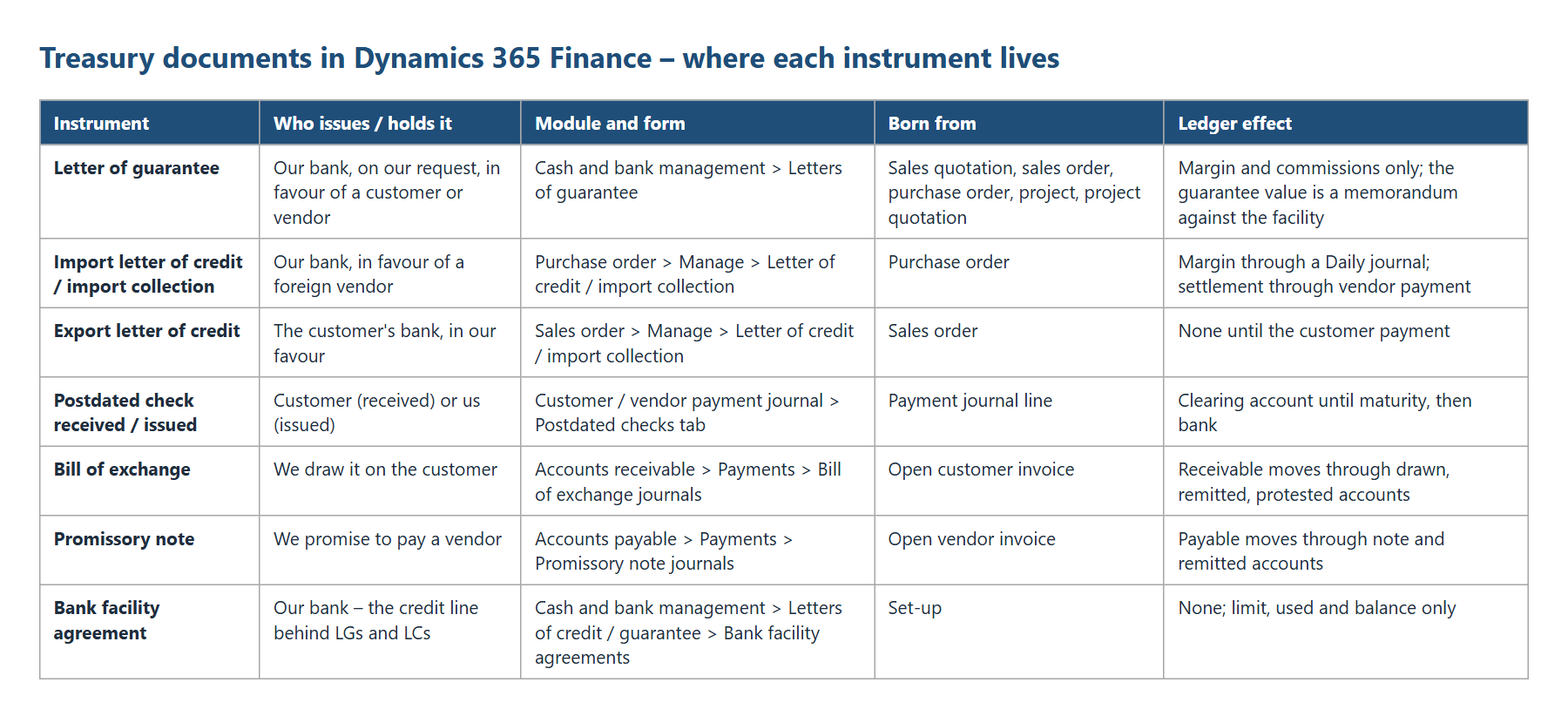
Three set-up areas are shared by the bank documents: the Cash and bank management parameters (the switches that turn each feature on), bank facilities (facility groups, facility types and facility agreements per bank account) and the bank documents posting profile (the margin, charges, settlement and liquidation accounts). Negotiable instruments use the normal accounts receivable and accounts payable set-up instead: methods of payment, posting profiles, journal names and parameters.
| Area | Bank documents (LG, LC) | Negotiable instruments (PDC, bill, note) |
|---|---|---|
| Switch on | Cash and bank management parameters > General > Bank document | PDC: Cash and bank management parameters > Postdated checks; bills and notes: configuration keys (on by default) |
| Credit line | Bank facility agreements | None |
| Accounts | Bank documents posting profile | Customer / vendor posting profiles, method of payment (bridging account) |
| Journal | LG journal (Daily) in parameters; LC margin in a Daily journal | Customer / vendor payment journals; bill and note journals |
| Number | LG number sequence; LC number typed by hand | Bill ID and Note ID number sequences; check number typed |
| Status | LG status and facility status; LC and shipment status | PDC status; bill / note status on the customer or vendor transaction |
The case company: SAMF
All examples in this book were run in the Contoso demo company SAMF (Contoso Entertainment System Saudi Arabia, accounting currency SAR, chart of accounts "Saudi Arabia"). SAMF was chosen for three reasons. First, it was almost empty: one bank account, a handful of customers and vendors, no facility agreements and no bank documents, so every set-up step in the book had to be done and is shown. Second, Saudi Arabia is a market where all of these documents are used every day: bank guarantees in construction and government contracts, letters of credit for imports from Asia, and postdated checks in distribution. Third, the Saudi localization activates the letter of credit charges functions (the "_SA" objects), so we can also show where localization adds or limits functionality.
All records created for the book use the prefix TRS- (journal names, payment methods, posting profiles, payment terms, reason codes) or the next free SAMF number (customers, vendors, orders). The business cases are:
| Party | Account | Currency | Used for |
|---|---|---|---|
| TRS Jeddah Projects Co. | Customer SAMF-000008 | SAR | Bid bond and performance bond (LG), bills of exchange |
| TRS Gulf Retail LLC – Dubai | Customer SAMF-000009 | USD | Export letters of credit |
| TRS Al-Noor Distribution | Customer SAMF-000010 | SAR | Postdated checks received |
| TRS Shanghai Steel Mill Co. | Vendor SAMF-000008 | USD | Import letter of credit |
| TRS Dammam Industrial Supplies | Vendor SAMF-000009 | SAR | Postdated checks issued, endorsed check, promissory notes |
| Bank of Saudi (SAUBank) | Bank account SAUBank | SAR | LG facility, PDC, bills and notes |
| Gulf Trade Bank (TRS-GTB-US) | Bank account TRS-GTB-US | USD | Trade finance facility for LCs |
How to read this book
Each hands-on chapter follows the same pattern, so you always know where to look:
- Concept: what the document is in the real world, and why companies use it.
- Set-up: every form and every field that the document needs, with the value we used and the reason.
- Process: the steps in the order a user performs them, with the navigation path and a screenshot. Fields that we changed are marked with a red box.
- Negative cases: before the happy path, we try what the system should refuse – a missing field, a wrong status, an amount over the limit – and quote the exact message. These messages are what your users will see.
- Result: the posted voucher and the status, verified in the database behind the user interface.
- Business cases: how different industries use the same function.
Navigation paths are written with ">" between the levels, for example Cash and bank management > Setup > Cash and bank management parameters. Field descriptions use this layout:
Field name – Possible values
What the field does, when it matters and what happens if it is wrong.
Example: the value used in the book.
Negative cases look like this:
| NEGATIVE CASE: We tried to post a postdated check without a check number. Message: Postdated check method of payment is used and requires a Check Number to be filled in. |
|---|
| RESULT: Results are shown in a blue box: the voucher, its accounts and amounts, and the status of the document after the step. |
|---|
NOTE: Notes in an orange box point out traps, product limitations and things that behave differently from what you might expect.
Dates in the examples are October 2026 to February 2027. Where a step only makes sense in the future (for example, settling a postdated check on its maturity date), we changed the session date of the user (gear icon > Session date and time), never the system date, and we say so in the text.
Summary
Treasury documents are promises of payment, made by a bank (letters of guarantee and letters of credit) or by business partners (checks, bills of exchange and promissory notes). Dynamics 365 Finance supports all of them, with bank documents in Cash and bank management and negotiable instruments in accounts receivable and accounts payable. The next chapter prepares the ground: the parameters, accounts, journals and bank accounts that every document in this book needs.